
Clickdoc icon
Clickdoc icon

Clickdoc

Clickdoc is a Chrome extension that records your clicks and builds a step-by-step guide with a screenshot and a highlight for every step. Everything stays on your computer: there is no server, no account and no AI, and on the free plan it makes no network request at all.
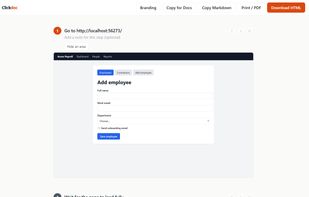
The guide editor: every click becomes a step with a screenshot and a highlight. Edit the text, blur, zoom, add notes.

Cost / License

  • Freemium (Pay once)
  • Proprietary

Platforms

  • Google Chrome
  • Microsoft Edge  Install from the Chrome Web Store link; Edge asks once to allow extensions from other stores.
  • Brave  Install from the Chrome Web Store link.
0likes
0articles
Save

Features

Properties

  1.  Lightweight
  2.  Privacy focused

Features

  1.  Ad-free
  2.  Support for MarkDown
  3.  No Tracking
  4.  No registration required
  5.  No Coding Required
  6.  Works Offline
  7.  Annotate Screenshot
  8.  Step-by-Step Guides

Clickdoc News & Activities

Highlights All activities

Recent activities

Clickdoc information

  • Developed by

    Clickdoc
  • Licensing

    Proprietary and Freemium product.
  • Pricing

    One time purchase (perpetual license) ranging between $49 and $149 + free version with limited functionality.
  • Alternatives

    10 alternatives listed
  • Badge

    Get an embeddable badge for Clickdoc
  • Supported Languages

    • English

AlternativeTo Category

Development

Popular alternatives

View all
Clickdoc was added to AlternativeTo by Clickdoc on and this page was last updated .

No comments or reviews, maybe you want to be first?

Official Links

What is Clickdoc?

Clickdoc is a Chrome extension that records your clicks and builds a step-by-step guide with a screenshot and a highlight for every step. Everything stays on your computer: there is no server, no account and no AI, and on the free plan it makes no network request at all. That makes it usable where cloud documentation tools are not allowed, such as payroll, finance, banking portals and client systems. Password and card-type fields are masked in the text and in the screenshots. Blur anything else, zoom to the click, add notes, then export one self-contained HTML file, Markdown, a paste into Google Docs, Notion or Confluence, or PDF. Free for 10 guides; $49 once for unlimited guides, $149 once for a team of five. It does not do hosted share links, team workspaces, AI-written steps or desktop apps.