




Decant
Privacy-first, open-source browser extension that turns web pages into clean Markdown locally, with Obsidian, Logseq, and Notion-friendly exports.

Cost / License
- Free
- Open Source (AGPL-3.0)
Platforms
- Google Chrome
- Mozilla Firefox
- Microsoft Edge


Features
- Browser-based
- Browser extension
Tags
Decant News & Activities
Recent activities
- love-all-adult added Decant
- POX updated Decant
 love-all-adult added Decant as alternative to AI Chat Exporter, AI Chat Exporter Extension, ChatGPT Exporter Chrome Extension and ChatSnapAI

Decant information
Developed by
 Covai Labs
 Licensing
Open Source (AGPL-3.0) and Free product.Written in
Alternatives
13 alternatives listedBadge
Get an embeddable badge for DecantSupported Languages
- English
- German
- Spanish
- French
- Japanese
- Tamil
- Chinese

AlternativeTo Category
Web BrowsersGitHub repository
- 4 Stars
- 2 Forks
- 0 Open Issues
- Updated


What is Decant?
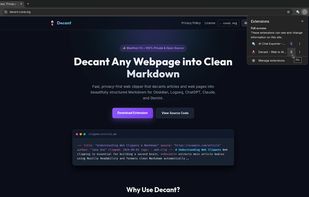
Decant is a fast, privacy-first, open-source browser extension that turns webpages, articles, documentation, and AI chats into clean, structured Markdown — directly in your browser.
Clip once. Paste anywhere you write.
WHAT IT DOES
Click Decant on any webpage to extract the main content, remove ads, navigation and clutter, and convert it to clean Markdown.
From the popup you can:
- Copy Markdown to your clipboard
- Download .md files or preview Markdown in a new tab
- Batch-clip all open tabs as a ZIP, combined note, or separate files
- Open clips directly in Obsidian, Logseq, Bear, NotePlan, or Drafts
FEATURES
Clean Markdown & AI Chat Extraction Powered by decant-core, Mozilla Readability and dedicated parsers. Extracts article text, headings, lists, code blocks, links and AI chat transcripts from ChatGPT and Claude.
Batch Multi-Tab Clipping Clip every open tab in the current window with one click or keyboard shortcut. Export individual Markdown files, a combined note, or a ZIP archive.
100% Local & Private Everything is processed locally in your browser. No servers, accounts, tracking or telemetry. Your content and reading habits stay on your device.
YAML Frontmatter Optionally add structured metadata such as title, URL, author, publication date, clip date and tags using a customisable template.
Note-Taking App Integration Open clips directly using URI schemes for Obsidian, Logseq, Bear, NotePlan and Drafts.
AI Handoff Prepare extracted content for analysis in ChatGPT, Claude, Gemini, DeepSeek or Perplexity. Customise prompts with {{title}}, {{url}} and {{content}}.
Markdown Controls
- ATX or Setext headings
- Dash, asterisk or plus bullet markers
- Fenced or indented code blocks
Multi-Language UI English, German, Spanish, French, Japanese, Tamil and Simplified Chinese.
KEYBOARD SHORTCUTS
Alt+Shift+M — Open Decant Alt+Shift+D — Clip current tab Alt+Shift+C — Copy current tab Markdown Alt+Shift+A — Clip all open tabs
Shortcuts can be customised in your browser's extension settings.
PERMISSIONS
Decant requests access to websites, tabs, downloads, clipboard, storage, context menus and the active tab. These permissions are used solely to extract webpage content, process open tabs, save files, copy Markdown, store local preferences and provide context-menu actions.
No data is sent to any server. Everything stays in your browser.
OPEN SOURCE
Decant is free and open source under the AGPL-3.0 licence.