
Apps tagged with 'Video Editing' Page 27 of 32

All apps in Apps tagged with 'Video Editing' category. Use the filters below to narrow down your search. 
Copy a direct link to this comment to your clipboard
  1. Visuall icon
     Like

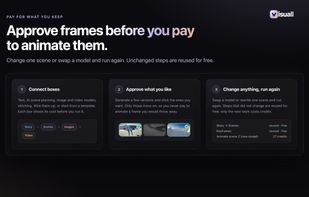
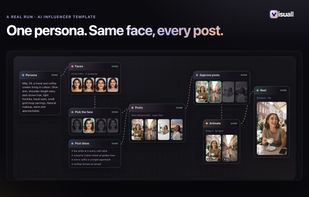
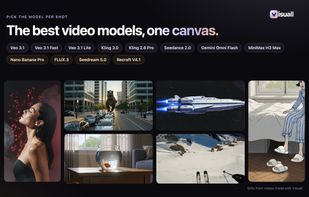
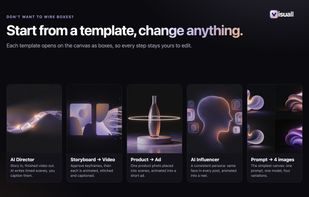
    Visuall is a workflow editor for making short films and ads with AI. Instead of one prompt and one clip, a film is laid out on a canvas as connected boxes you can see and change: the story, the scene plan, a keyframe for each scene, the clip for each scene, captions, and the...

    Cost / License

    • Paid
    • Proprietary

    Application type

    Platforms

    • Online
    • Software as a Service (SaaS)
    • FR flagFrance
    • European Union flagEU
    Visuall screenshot 1
    Visuall screenshot 1
    Visuall screenshot 2
    +1
    Visuall screenshot 3
    10 alternatives
  2. VidLet icon
     Like

    VidLet is a video toolkit built to be called rather than clicked. Trimming, compression, GIF export, speed changes, audio extraction and sensitive-area masking all run locally and without limits. On top of that sit the generative parts: AI transcription and karaoke-style...

    Cost / License

    • Freemium
    • Proprietary

    Application type

    Platforms

    • Mac
    • Windows
    • Linux
    • GB flagUnited Kingdom
    VidLet: video editing driven from the CLI or an AI assistant over MCP
    Docs for the MCP server and the command line interface
    Local editing, AI captions, voiceover and one-call short-form video
    7 alternatives
  3. BeatSync PRO is AI-powered music video creation software for Windows. It automatically syncs your video clips to music beats, turning 8 hours of manual editing into 5 minutes.

    Cost / License

    • Freemium
    • Proprietary

    Application type

    Platforms

    • Windows
    • US flagUnited States
    BeatSync PRO screenshot 1
    BeatSync PRO screenshot 1
    BeatSync PRO screenshot 2
    +8
    BeatSync PRO screenshot 3
    50 alternatives
  4. Automatically make MANY fully edited trailers with a single click! It only needs a few video clips, 2 title cards, 2 audio files and it will assembled a fully edited trailer video that gets the job done.

    Cost / License

    • Free
    • Proprietary

    Application type

    Platforms

    • Windows
    • FI flagFinland
    • European Union flagEU
    Auto Movie Assembler screenshot 1
    Auto Movie Assembler screenshot 1
    Auto Movie Assembler screenshot 2
    +3
    Auto Movie Assembler screenshot 3
    19 alternatives
  5. I Have a Dream is revolutionizing face-less social media video creation with an all-in-one tool that lets you generate a ready-to-use video in just 3 minutes of work. With its powerful AI engine, I Have a Dream turns text or keywords into a compelling script, images, voiceover...

    Cost / License

    • Paid
    • Proprietary

    Application type

    Platforms

    • Windows
    I Have a Dream screenshot 1
    8 alternatives
  6. VideoSolo EditFUN is a timeline-based video editing software designed for both beginners and experienced users. With EditFUN, you are able to use its rich built-in effects and advanced features like keyframe editing to create your own masterpiece.

    Cost / License

    • Paid
    • Proprietary

    Application type

    Platforms

    • Windows
    • HK flagHong Kong SAR China
    VideoSolo EditFUN screenshot 1
    1 alternatives
  7. VlogMe icon
     Like

    VlogMe is an AI video creation platform for producing complete, editable videos in one connected workflow. Users can start with an idea, script, image, audio, or existing video, plan the production with an AI Director, and then generate and refine scenes using multiple AI video...

    Cost / License

    • Freemium
    • Proprietary

    Application type

    Platforms

    • Online
    • Software as a Service (SaaS)
    Plan scripts, scenes, and complete video workflows with VlogMe's AI Director.
    8 alternatives
  8. CutBench icon
     Like

    Windows app that finds the best moments in long gaming recordings and cuts them as ranked vertical clips with captions, on your own PC. $34.99 once on Steam.

    Cost / License

    • Paid
    • Proprietary

    Application type

    Platforms

    • Windows
    CutBench screenshot 1
    CutBench screenshot 1
    CutBench screenshot 2
    +3
    CutBench screenshot 3
    11 alternatives
  9. Rendobar icon
     1 like

    A serverless media processing API for running FFmpeg, creating animated captions, and generating, editing, and upscaling images.

    Cost / License

    • Freemium
    • Proprietary

    Application type

    Platforms

    • Online
    • Software as a Service (SaaS)
    Shows that Rendobar accepts raw FFmpeg commands rather than requiring a proprietary preset or workflow language.
    Shows live job progress, logs, machine type, and cost, demonstrating runtime visibility and observability.
    Shows compute usage and per-second billing, highlighting transparent usage-based pricing.
    47 alternatives
  10. The easiest video editor software video scissors lets you select only the parts of videos you want and then string them together into a polished and finished copy. As you process your final video, you can also choose from multiple output formats depending on your needs.

    Cost / License

    • Free
    • Proprietary

    Application type

    Platforms

    • Mac
    • CN flagChina
    Video Scissors screenshot 1
    22 alternatives
  11. ActionCam icon
     Like

    Ashampoo ActionCam features next-gen video stabilization! Even handheld shots taken in full motion become more steady for a realistic, smooth viewing experience - at max resolution, naturally!.

    Cost / License

    • Paid
    • Proprietary

    Application type

    Platforms

    • Windows
    • DE flagGermany
    • European Union flagEU
    ActionCam screenshot 1
    ActionCam screenshot 1
    ActionCam screenshot 2
    87 alternatives
  12. FilmForth is an intuitive and powerful free video editor. It is a free windows movie maker and slideshow maker. As a movie maker windows 10, you can make movies from your photos, video clips, and music.

    Cost / License

    • Free
    • Proprietary

    Application type

    Platforms

    • Windows
    • US flagUnited States
    FilmForth - Movie Maker screenshot 1
    FilmForth - Movie Maker screenshot 1
    FilmForth - Movie Maker screenshot 2
    +2
    FilmForth - Movie Maker screenshot 3
    94 alternatives
  13. Shotnix icon
     Like

    Free, open-source screenshot tool, screen recorder, and video editor for Mac. Auto-zoom, smooth cursor, captions, OCR, scrolling capture, and annotations. Native, private, no account.

    Cost / License

    • Free
    • Open Source (MIT)

    Application type

    Platforms

    • Mac
    • DE flagGermany
    • European Union flagEU
    The video editor: every recording opens with a background, a zoom on each click and captions, ready to export.
    Edit by text: delete a word in the transcript and it's cut from the video.
    The screenshot editor: arrows, numbered steps, callouts, blur and a background, all in one place.
    +1
    Export MP4 up to 4K at 60 fps, or a GIF, with no watermark.
    10 alternatives
  14. JayCut icon
     Like

    Whether it is from your camera, mobile phone or webcam – upload all the clips you want, in over a hundred different file formats, all at once. When it is on JayCut you can make many clips into one file, a mix, trimming the boring parts out, adding captions and music – making it...

    Cost / License

    • Free
    • Proprietary

    Application type

    Alerts

    • Discontinued

    Platforms

    • Online
    JayCut screenshot 1
    11 alternatives
  15. VideoGrade is a color grading tool for your videos. It features high quality filters that will let you adjust the image on your videos in any way you can imagine. VideoGrade is built with freedom in mind: you will have total control over each of the filters.

    Cost / License

    • Paid
    • Proprietary

    Application type

    Platforms

    • iPhone
    • iPad
    VideoGrade screenshot 1
    VideoGrade screenshot 1
    VideoGrade screenshot 2
    +7
    VideoGrade screenshot 3
    7 alternatives
  16. Magic Bullet Denoiser III lets you reduce visible noise and grain in digital video produced by digital video cameras, camcorders, or film. Shooting in low light or at high ISO’s can add a lot of noise to your footage. Denoiser gets rid of that without removing detail.

    Cost / License

    • Paid
    • Proprietary

    Application type

    Platforms

    • Mac
    • Windows
    • Apple Motion
    • Adobe After Effects
    • Final Cut Pro X
    • Adobe Premiere Pro
    • US flagUnited States
    Magic Bullet Denoiser screenshot 1
    2 alternatives
  17. HanFlow Cut lets you trim, split and change speed on a timeline, add subtitles, icons and background music, and export to MP4. Auto captions turn speech into subtitles, with caption styles and effects. Part of HanFlow PC, light and ad-free apps with no sign-in.

    Cost / License

    • Paid
    • Proprietary

    Application type

    Platforms

    • Mac
    • Windows
    • KR flagSouth Korea
    HanFlow Cut screenshot 1
    HanFlow Cut screenshot 1
    HanFlow Cut screenshot 2
    +1
    HanFlow Cut screenshot 3
    51 alternatives
  18. Magic Mix icon
     Like

    The ultimate audio automation tool for social media: upload videos to extract audio, align tracks, and generate perfectly mixed Reels or TikToks in just 10 seconds.

    Cost / License

    • Freemium
    • Proprietary

    Platforms

    • Online
    • IT flagItaly
    • European Union flagEU
    Magic Mix screenshot 1
    Magic Mix screenshot 1
    Magic Mix screenshot 2
    17 alternatives
  19. User-friendly video editor that is free for online usage and for computer. All the most popular video editing features and video formats are supported. No watermark, supports working with audio, timeline and more.

    Cost / License

    • Free
    • Proprietary

    Application type

    Platforms

    • Windows
    • Online
    • CY flagCyprus
    • European Union flagEU
    Main interface of the website
    19 alternatives
  20. YouMetry icon
     Like

    Telemetry gauges on your video and the route replayed in 3D: speed, G-forces, lean angle, lap times and OBD-II from GoPro, DJI, Insta360 or RaceChrono files.

    Cost / License

    • Paid
    • Proprietary

    Application type

    Platforms

    • Mac
    • Windows
    • Android
    • CH flagSwitzerland
    Car onboard with speed, G-forces and track map, plus the 3D replay inset
    Drone flight replayed in 3D over the real terrain from the DJI SRT file
    DJI drone video with live gauges: speed, altitude, heading, horizon
    +1
    GoPro motorcycle onboard with speed, lean angle and corner data
    12 alternatives