Shotnix icon
Shotnix icon

Shotnix

Free, open-source screenshot tool, screen recorder, and video editor for Mac. Auto-zoom, smooth cursor, captions, OCR, scrolling capture, and annotations. Native, private, no account.
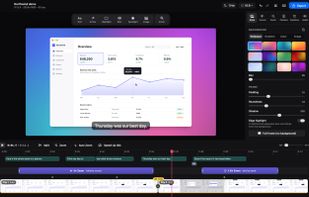
The video editor: every recording opens with a background, a zoom on each click and captions, ready to export.

Cost / License

  • Free
  • Open Source (MIT)

Platforms

  • Mac
0likes
0articles
Save

Features

Properties

  1.  Privacy focused
  2.  Lightweight

Features

  1.  Ad-free
  2.  Screen Sharing
  3.  Support for Layers
  4.  Dark Mode
  5.  No Tracking
  6.  Transitions Effects
  7.  Support for 4K
  8.  Works Offline
  9.  No registration required
  10.  Keyframe Animation
  11.  Annotate Screenshot
  12.  Video screen capture
  13.  Screen Recording

Shotnix News & Activities

Highlights All activities

Recent activities

Shotnix information

AlternativeTo Categories

Video & Movies, Photos & Graphics, Remote Work & Education

GitHub repository

  •  66 Stars
  •  6 Forks
  •  0 Open Issues
  •   Updated  
View on GitHub
Shotnix was added to AlternativeTo by Omar-Khaled on and this page was last updated .

No comments or reviews, maybe you want to be first?

Official Links

What is Shotnix?

Shotnix is a free, open-source Mac app that brings together a screenshot tool, a screen recorder and a video editor.

Screenshots: capture an area, a window, the full screen or a long scrolling page. Annotate with arrows, text, numbered steps, blur and highlights, add a background, copy text from any image with OCR, pin captures on screen and search your history.

Recordings: record an area, a window or a display at up to 60 fps with your microphone, system audio and webcam. Every recording opens in the editor already polished: it zooms where you click, the cursor moves smoothly, and captions are transcribed on your Mac. Delete words from the transcript to cut them from the video, remove filler words in one click, and export MP4 up to 4K at 60 fps or GIF, horizontal or vertical (9:16).

No account, no watermark, no subscription, and nothing leaves your Mac. Native Swift app, about a 12 MB download, in six languages.

