ShotGlass icon
ShotGlass icon

ShotGlass

Screenshot and screen recorder app for macOS. One app instead of four. Capture multiple windows, annotate, zoom, add transitions, and drop your recording onto a 3D MacBook with a simulated lens. Everything stays local.
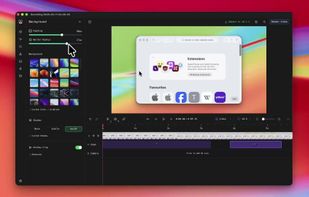
ShotGlass screenshot 1

Cost / License

  • Freemium (Pay once)
  • Proprietary

Platforms

  • Mac
0likes
0comments
0articles

Features

  1.  Works Offline
  2.  Ad-free
  3.  Wallpaper Cycling
  4.  No registration required
  5.  Annotate Screenshot
  6.  Transitions Effects
  7.  Automatic Zoom
  8.  Screen Recording
  9.  Custom Cursors
  10.  Trim video
  11.  Custom Backgrounds

ShotGlass News & Activities

Highlights All activities

Recent activities

ShotGlass information

  • Developed by

    AU flagJake Manger
  • Licensing

    Proprietary and Freemium product.
  • Pricing

    One time purchase (perpetual license) ranging between $17 and $29 + free version with limited functionality.
  • Alternatives

    98 alternatives listed
  • Supported Languages

    • English

AlternativeTo Categories

Photos & GraphicsVideo & Movies
ShotGlass was added to AlternativeTo by Paul on and this page was last updated .
No comments or reviews, maybe you want to be first?

What is ShotGlass?

Beautiful screen captures, without the effort. The screen recording and screenshot app that does the polish for you, so sharing takes minutes not hours.

Start by selecting a window, screen or area

Auto window detection across multiple windows and monitors.

Get automatic zoom

ShotGlass makes things look cinematic straight after shooting.

  • Smart automatic zoom: Straight after recording, ShotGlass automatically zooms in on the actions you perform on screen.
  • Manual zoom: Simply drag your zooms on the timeline or click to add new custom ones.
  • Easy editing: Adjust zooms, trim, cut and speed up.

Customisable and clear backgrounds

Cluttered background? Don't worry, ShotGlass swaps it out automatically, making every screenshot and screen recording look professional.

  • Removes that clutter on your desktop for you, keeping focus on what you're recording.
  • Choose from a selection of real Mac backgrounds, upload or make something custom.
  • Add shadow and padding.

Smooth animations and a custom cursor

Effects that normally take hours are now instant.

  • Smooth cursor movements: Cursor movements are automatically smoothed for professional-looking recordings.
  • Animated transitions: Add professional transitions between scenes with a single click.
  • Make your cursor bigger and animated: Make what you're doing easy to see.

Add annotations

Highlight important parts of your screenshots and screen recordings with the annotation tools.

Record cameras, microphone and system audio

ShotGlass can record and mix multiple video and audio sources with your screen recording.

Export and share

Optimal settings by default. Choose presets for exporting to Social Media, the Web or for further editing in another editor.

Official Links