FullGrab icon
FullGrab icon

FullGrab

Capture visible areas, full pages, regions, elements and screen recordings, then remove clutter, annotate or redact details. Extract OCR text, tables, links or Markdown; create searchable PDFs, share results or send them to AI while keeping captures local by default.
FullGrab screenshot 1

Cost / License

  • Freemium (Subscription)
  • Proprietary

Platforms

  • Google Chrome

Features

Properties

  1.  Lightweight
  2.  Privacy focused

Features

  1.  Full-page Screenshot
  2.  Upload Screenshot
  3.  Ad-free
  4.  No Tracking
  5.  No registration required
  6.  Annotate Screenshot
  7.  Works Offline
  8.  Edit screenshots
  9.  Share screenshots
  10.  Screenshot OCR
  11.  Screen Recording

FullGrab News & Activities

Highlights All activities

Recent activities

FullGrab information

  • Developed by

    US flagPB2025
  • Licensing

    Proprietary and Freemium product.
  • Pricing

    Subscription that costs $5 per month + free version with limited functionality.
  • Alternatives

    74 alternatives listed
  • Badge

    Get an embeddable badge for FullGrab
  • Supported Languages

    • English

AlternativeTo Categories

Photos & GraphicsWeb BrowsersVideo & Movies
FullGrab was added to AlternativeTo by PB2025 on and this page was last updated .
No comments or reviews, maybe you want to be first?

Official Links

What is FullGrab?

FullGrab is a Chrome extension that allows you to capture, edit, and export screenshots directly on your device. It can turn any content on a webpage into a finished piece of work. You can capture exactly what you need, remove unnecessary elements, protect sensitive data, extract text or data, and export or share it all from one platform. It replaces the need for separate screenshot, editing, OCR, PDF, recording, and AI tools.

Features include:

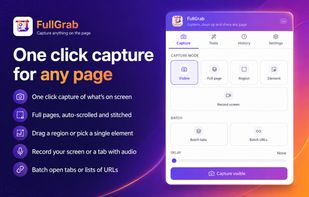
  • Capturing any visible area, full page, specific region, single element, screen recording, or batch capture.
  • Cleaning up captures by removing clutter, adding annotations, cropping, refining, and redacting sensitive text.
  • Converting webpages into useful content through OCR, table extraction, link extraction, markdown conversion, searchable PDF creation, and compression.
  • Working faster by sending captured content to AI tools, generating AI summaries, accessing capture history, performing reverse image searches, viewing Wayback history, keeping FullGrab open in a side panel, and sharing or syncing captures.
  • Privacy is a priority, with captures staying on your device by default. Online services are only used when required.

FullGrab is designed for anyone who needs to save, present, analyze, document, or share web content.
