
ClipKeeper icon
ClipKeeper icon

ClipKeeper

Keeps your OBS recording from breaking and your clips in order: guard, library by game, trim editor. Windows, unofficial.
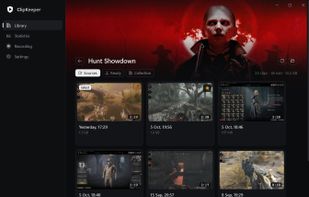
ClipKeeper screenshot 1

Cost / License

  • Free
  • Open Source (MIT)

Platforms

  • Windows
0likes
0articles
Save

Features

Features

Highlights All activities

ClipKeeper News & Activities

Recent activities

ClipKeeper information

GitHub repository

  •  6 Stars
  •  0 Forks
  •  3 Open Issues
  •   Updated  
View on GitHub
ClipKeeper was added to AlternativeTo by Alukkart on and this page was last updated .

No comments or reviews, maybe you want to be first?

Official Links

What is ClipKeeper?

ClipKeeper is a free, open-source tray companion for OBS Studio on Windows 10/11. It is not a recorder by itself: it works alongside OBS (28+) through the built-in obs-websocket, so OBS Studio is required.

It has two halves, and each can be turned off.

Recording guard: OBS can break silently, and you only find out after saving a clip. ClipKeeper watches for that and fixes it automatically:

  • keeps audio and screen capture sources on the right devices, even after a driver or audio software update (SteelSeries Sonar, Voicemeeter) changes device IDs;
  • restarts a crashed replay buffer, and OBS itself after a crash;
  • notices audio that never reaches OBS and a black or frozen picture;
  • checks every saved clip: length, all audio tracks, dropped frames;
  • if it can't fix something, shows an alarm over the game that doesn't steal focus.

Clip library: saved clips are sorted into folders by game, with covers. A frame-exact trim editor cuts pieces from the middle, mixes tracks with per-track volume, and exports lossless or in one click for Discord (10 MB), Nitro or Telegram. Statistics show what you record and what you keep.

No accounts, no telemetry, no ads. The interface is in English and Russian.
