





Diskivo
Like
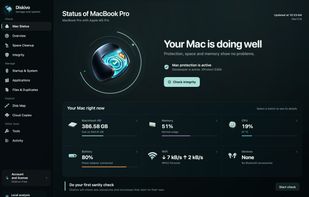
Apple Silicon macOS utility for mapping folders and large files, comparing duplicate files and similar images, uninstalling apps with leftovers, monitoring system activity, and reviewing caches, logs, installers, and developer files locally.

Cost / License
- Pay once or Subscription
- Proprietary
Application typeApplication types
 EU
Since
- New


Features
Highlights All activities
Diskivo News & Activities
Recent activities
 Mauricio B. Holguin added Diskivo as alternative to MacSpaceBack and MacSpace
 worksdem added Diskivo as alternative to App Cleaner & Uninstaller, MacCleaner Pro, CleanMacster, Sensei and 2 more
- worksdem added Diskivo
 Fla added Diskivo as alternative to PureMac, Kudu, MacOSCleaner, Sweep for Mac and 4 more
- Fla updated Diskivo
- worksdem updated Diskivo
- worksdem updated Diskivo
 worksdem added Diskivo as alternative to CleanMyMac, Mole and AppCleaner


Developed by
 Worksdem
Licensing
Proprietary and Commercial product.Pricing
One time purchase ranging between $79 and $112, and / or subscription ranging between $34 and $45 per year.Alternatives
19 alternatives listedBadge
Get an embeddable badge for DiskivoSupported Languages


No comments or reviews, maybe you want to be first?