• Obsidian icon
  • Pine Markdown Editor icon
  • MarkText icon
  • Trilium Notes icon
  • Notion icon
  • +12

do they provide productivity?

aloalo17 appsUpdated
Copy a direct link to this comment to your clipboard

A random-ish bunch of (personal) knowledge management related software I have tried, would like to try, or decided not to try. With comments.

Writing, organizing, note-taking. Best or most interesting towards the top.

  1. Obsidian icon
     Like

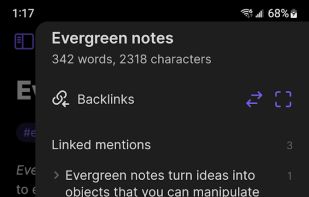
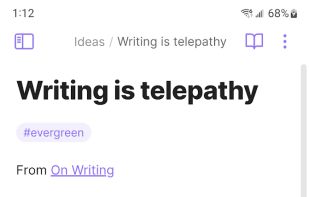
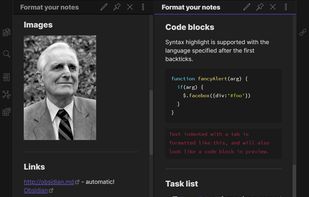
    Obsidian is a note-taking app that lets you create a personal knowledge graph with ease. It is designed for non-linear thinking and allows you to easily link your notes together wiki-style.

    Cost / License

    • Freemium
    • Proprietary

    Application type

    Platforms

    • Mac
    • Windows
    • Linux
    • Android
    • iPhone
    • Android Tablet
    • iPad
    • Snapcraft
    • Microsoft Edge
    • Google Chrome
    • Flathub
    • Safari
    • AppImage
    • Mozilla Firefox
    Obsidian screenshot 1
    Obsidian screenshot 1
    Obsidian screenshot 2
    +6
    Obsidian screenshot 3
    aloalo’s note

    super super interesting. Interlinking and the automatic reference collection look nice. Gotta test. Basically free but not FOSS, sadly.

  2. A modern macOS markdown editor - themeable, tabs, sidebar, GitHub flavored markdown, exporting, latex and more.

    Cost / License

    • Free
    • Open Source

    Platforms

    • Mac
    Pine Markdown Editor screenshot 1
    Pine Markdown Editor screenshot 1
    aloalo’s note

    For Mac, written in Swift. Not js, which is good. Not tested (yet) but seems to have the right features, i.e. nice formatting incl. latex and sidebar.

  3. MarkText icon
     Like

    Markdown editor for Mac, Windows, and Linux with real-time preview and distraction-free interface. Open source, free on GitHub, supports various Markdown specs.

    Cost / License

    • Free
    • Open Source

    Application type

    Platforms

    • Mac
    • Windows
    • Linux
    GitHub Flavored Markdown
    Auto-Completion
    Code Fence
    +4
    Source Code Mode
    aloalo’s note

    oh wow this looks fabulous with a promising mix of features

  4. The original trilium is transfered to this repo by its owner and the app continues to develop here as stated here: https://github.com/TriliumNext/Trilium

    Cost / License

    • Free
    • Open Source

    Application type

    Platforms

    • Mac
    • Windows
    • Linux
    • Self-Hosted
    • Google Chrome
    • Cloudron
    • Mozilla Firefox
    Trilium Notes screenshot 1
    Trilium Notes screenshot 1
    Trilium Notes screenshot 2
    +9
    Trilium Notes screenshot 3
    aloalo’s note

    A proper personal wiki!

    Oh I wish this was properly available on Mac.

  5. Notion icon
     Like

    Streamline teamwork with real-time collaboration, drag-and-drop content organization, and visual simplicity across notes, tasks, wikis, and databases.

    Cost / License

    • Freemium
    • Proprietary

    Application type

    Platforms

    • Mac
    • Windows
    • Online
    • Android
    • iPhone
    • Android Tablet
    • iPad
    • Software as a Service (SaaS)
    Notion screenshot 1
    Notion screenshot 1
    Notion screenshot 2
    +12
    Notion screenshot 3
    aloalo’s note

    Looks promising with all the fuss. The basic features and use cases tickle me the right way but I've been putting on my tinfoil hat lately. The only option is to store all the information in the cloud and I'm not willing to put my life's invaluable information solely there. Then there's the privacy question with US servers.

  6. StackEdit icon
     Like

    Full-featured, open-source Markdown editor based on PageDown, the Markdown library used by Stack Overflow and the other Stack Exchange sites.

    Cost / License

    • Free
    • Open Source

    Application type

    Platforms

    • Online
    • Chrome OS
    • Google Chrome
    StackEdit 5 - Split interface (Dark)
    StackEdit screenshot 1
    aloalo’s note

    a browser editor. Looks polished and no-nonsense, though. With a quick try, I'm intrigued, but cautious.

  7. Skrifa icon
     Like

    A simple note taking application for your computer focused on privacy, using PGP keys to encrypt all your notes by default.

    Cost / License

    • Free
    • Open Source

    Application type

    Platforms

    • Mac
    • Windows
    • Linux
    • Google Chrome
    Skrifa screenshot 1
    Skrifa screenshot 1
    Login Screen
    +5
    Notes and Notebooks
    aloalo’s note

    With the encryption schema sounds like Standard Notes but a bit more polished/fancy UI. Even a PGP option! FOSS. Not tested.

  8. Zettlr icon
     Like

    Comprehensive writing tool for notes, citations, and drafting with privacy-first features and multi-language support, perfect for diverse writing tasks.

    Cost / License

    • Free
    • Open Source

    Application type

    Platforms

    • Mac
    • Windows
    • Linux
    • Flathub
    • PortableApps.com
    Zettlr Main Window (dark mode)
    Zettlr Main Window (light mode)
    The Berlin Theme (dark mode)
    +5
    The Berlin Theme (light mode)
    aloalo’s note

    Looks it can organize and, what's important, interlink notes. Tested it for a while some time ago, there was probably something with how the notes were displayed/organized.

  9. Joplin icon
     Like

    Open source note-taking app with Markdown support, to-do integration, and synchronization with cloud services like Dropbox and OneDrive.

    Cost / License

    • Freemium
    • Open Source

    Application type

    Platforms

    • Mac
    • Windows
    • Linux
    • Online
    • Android
    • iPhone
    • Android Tablet
    • iPad
    • Self-Hosted
    • AppImageHub
    • Snapcraft
    • Google Chrome
    • Flathub
    • PortableApps.com
    • F-Droid
    • Cloudron
    • Homebrew
    • Chocolatey
    • Termux
    • Mozilla Firefox
    Joplin screenshot 1
    Joplin screenshot 1
    Joplin screenshot 2
    +7
    Joplin screenshot 3
    aloalo’s note

    Interesting piece of software. Tried once shortly, should test it more.

  10. An end-to-end encrypted note-taking by Proton. Offline access, unlimited sync across devices, tagging, passcode and biometric security, plus advanced premium privacy features.

    Cost / License

    • Freemium
    • Open Source

    Application type

    Platforms

    • Mac
    • Windows
    • Linux
    • Online
    • Android
    • iPhone
    • Chrome OS
    • Android Tablet
    • iPad
    • Self-Hosted
    • F-Droid
    • OpenAPK
    Plain text note on free version.
    Cross-platform sync and end-to-end privacy
    A note using the Super note editor.
    +1
    Extensions and Themes
    aloalo’s note

    Used it for a while. Really not bad and I like the design philosophy, but the UX wasn't that great on Mac. Migrated to Nextcloud Notes to be more accessible and easily editable using independent markdown editor.

  11. Bear icon
     Like

    Flexible writing and note-taking tool with markdown, plain text storage, cross-note links, hashtags, powerful search, Focus Mode, iCloud sync, and export options.

    Cost / License

    • Freemium
    • Proprietary

    Application type

    Platforms

    • Mac
    • Online
    • iPhone
    • iPad
    Bear screenshot 1
    Bear screenshot 1
    Bear screenshot 2
    +5
    Bear screenshot 3
    aloalo’s note

    Nice app per se but the editor felt sluggish (some time ago) and was migrated to Standard Notes.

  12. ghostwriter is a feature-rich text editor using Markdown syntax which makes it suitable for note-taking, document redaction, simple HTML website creation and much more.

    Cost / License

    • Free
    • Open Source

    Application type

    Platforms

    • Mac
    • Windows
    • Linux
    • Snapcraft
    • Flathub
    • Haiku
    ghostwriter screenshot 1
    ghostwriter screenshot 1
    ghostwriter screenshot 2
    +1
    ghostwriter screenshot 3
    aloalo’s note

    Looks nice and would like to test it, sadly there was no readily available app bundle for Mac. C++ sounds like quickness.

  13. Typora icon
     Like

    A cross-platform Markdown editor providing real-time preview, Focus & Typewriter modes, and support for multiple export formats.

    Cost / License

    • Paid
    • Proprietary

    Application type

    Platforms

    • Mac
    • Windows
    • Linux
    • Electron
    • Visual Studio Code
    Typora screenshot 1
    Typora screenshot 1
    Typora screenshot 2
    +4
    Typora screenshot 3
    aloalo’s note

    I think I tried this once and there was something why it didn't stick. Also, it's free only during the beta (in which it has been for a while already).

  14. A markdown editor for desktop.

    Cost / License

    • Free
    • Open Source

    Application type

    Platforms

    • Mac
    • Windows
    • Linux
    • Electron / Atom Shell
    Inline preview as you type
    Preview images, math formulas, todo lists and iframes (such as Youtube videos)
    Code coloration
    +2
    Spell checker
    aloalo’s note

    Nice colors, but Electron/js make it probably needlessly heavy. Not tested.

  15. Simple but configurable and themeable, distraction-free text editor for writers. Open-source and available across desktop platforms.

    Cost / License

    • Free
    • Open Source

    Application type

    Platforms

    • Windows
    • Linux
    • PortableApps.com
    FocusWriter screenshot 1
    Themes
    Modify theme
    +7
    Set timer
    aloalo’s note

    I think I tried this almost a decade ago. Can't say much more.

  16. Ulysses icon
     Like

    Ulysses is a text editor for creative writers. Used by bloggers, poets, students and published novelists all over the world, it offers an integrated environment to brainstorm, draft, revise and even submit text on a professional level.

    Cost / License

    • Paid
    • Proprietary

    Application type

    Platforms

    • Mac
    • iPhone
    • iPad
    Ulysses screenshot 1
    Ulysses screenshot 1
    Ulysses screenshot 2
    +5
    Ulysses screenshot 3
    aloalo’s note

    Tried and almost bought it some time ago. There was something now inarticulable missing or wrong, maybe related to note organization or file format (and iCloud lock-in). Therefore didn't feel matching its price tag.

  17. Microsoft OneNote, part of the Microsoft 365 Copilot icon Microsoft 365 Copilot, is a digital notebook application that gives people one place to gather notes and information. It also offers shared notebooks, syncing between multiple computers and devices via Windows...

    Cost / License

    • Freemium
    • Proprietary

    Application type

    Platforms

    • Mac
    • Windows
    • Online
    • Android
    • iPhone
    • Chrome OS
    • Windows Phone
    • iPad
    • Apple Watch
    • Android Wear
    • Kindle Fire
    Microsoft OneNote screenshot 1
    Microsoft OneNote screenshot 1
    Microsoft OneNote screenshot 2
    +4
    Microsoft OneNote screenshot 3
    aloalo’s note

    The UI is terrible. Really. I can't understand wth has thought the Ribbon thing ever was a good idea anyway. The best thing (in some cases) is WYSIWYG and the ability to create complex-ish content (such as tables with colors). In the process of migrating away. The tables get probably replaced with plain Sheets.

Well, some did provide productivity, some didn't stick. Current go-to solution for general writing, outlining, drafting, and note-taking is Nextcloud Notes with a third party editor.

Actually, I put todo-notes usually directly into my calendar so they get eventually done. For the quick and tiny things, Google Keep is surprisingly good.

No comments so far, maybe you want to be first?