Apps tagged with 'powerpoint-addon'

All apps in Apps tagged with 'powerpoint-addon' category. Use the filters below to narrow down your search. 
Copy a direct link to this comment to your clipboard
  1. Office Tab icon
     20 likes

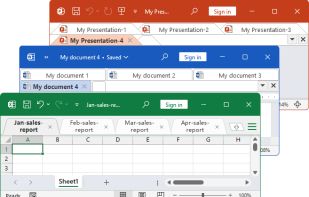
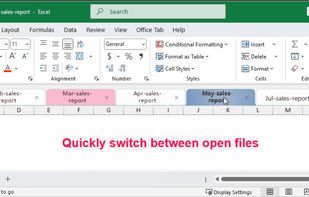
    Adds a tabbed interface to Word, Excel, PowerPoint, and more, letting users manage, switch, and organize multiple Office documents in a single workspace.

    Cost / License

    • Paid
    • Proprietary

    Platforms

    • Windows
    • Microsoft 365
    • Microsoft 365 (Office)
    Office Tab screenshot 1
    Office Tab screenshot 1
    4 alternatives
  2. iSpring Suite icon
     19 likes

    Toolkit for creating interactive courses, quizzes, and dialogue simulations with PowerPoint integration, adaptive player, and LMS compatibility. Supports collaboration, video, and web sharing.

    Cost / License

    • Paid
    • Proprietary

    Application type

    Platforms

    • Windows
    • Microsoft PowerPoint
    Convert PowerPoint into eLearning Courses
    Record Screencasts and Teach Through Video
    Develop Conversation Skills
    +7
    Create eLearning Interactions
    26 alternatives
  3. File Specific Automatic BackUps

    BackUp Xplorer creates an environment where the user controls the frequency, location, and number of backups for each individual file.

    Works With: Excel | Word | PowerPoint | Publisher | Project.

    Cost / License

    • Paid
    • Proprietary

    Platforms

    • Windows
    • Microsoft Office Powerpoint
    • Microsoft Office Outlook
    • Microsoft Project
    • Microsoft Office Publisher
    • Microsoft Office Word
    • Microsoft Office Excel
    BackUp Xplorer In The Microsoft Outlook Task Pane
    BackUp Xplorer In The Microsoft Excel Task Pane
    BackUp Xplorer In The Microsoft Word Task Pane
    +4
    BackUp Xplorer In The Microsoft PowerPoint Task Pane
    1 alternatives
  4. ClassPoint icon
     8 likes

    ClassPoint is an all-in-one, interactive teaching tool designed to improve presenting efficiency and teaching with PowerPoint.

    Cost / License

    • Freemium
    • Proprietary

    Application types

    Platforms

    • Windows
    • Microsoft Office Powerpoint
    • Software as a Service (SaaS)
    ClassPoint in PowerPoint
    Word Cloud Question Type
    Video Upload Question Type
    +4
    Slide Drawing Question Type
    20 alternatives
  5. Frustrated by endless searches for features on the ribbon? This software brings back the classic and familiar menus and toolbars to Microsoft Office 2010, 2013 and 2016 (includes Office 365). The classic view allows you to work with Office 2010, 2013 and 2016 as if it were...

    Cost / License

    • Paid
    • Proprietary

    Platforms

    • Windows
    • Microsoft Office Suite
    Classic menus and toolbars in Office 2013
    Classic Menus and Toolbars in Office 2010
    Supports All Languages
    5 alternatives
  6. Web Xplorer icon
     2 likes

    The Best MS Office Task Pane Integrated Fully Functional Web Browser.

    Cost / License

    • Paid
    • Proprietary

    Platforms

    • Windows
    • Microsoft Office Suite
    Web Xplorer In The Microsoft Excel Task Pane
    Web Xplorer In The Microsoft WordTask Pane
    Web Xplorer In The Microsoft PowerPoint Task Pane
    +4
    Web Xplorer In The Microsoft Project Task Pane
    17 alternatives
  7. DialogLoop icon
     3 likes

    DialogLoop is an Audience Engagement Platform for Presenters, Zoomers, Live Streamers, Companies, Performers, and Event Organizers who want to interact with their Audience during Live, Hybrid, and Remote Events using Video Conferencing solutions or Video Streaming solutions (OBS...

    Cost / License

    • Freemium
    • Proprietary

    Application types

    Platforms

    • Windows
    • Online
    • Self-Hosted
    • Software as a Service (SaaS)
    DialogLoop screenshot 1
    DialogLoop screenshot 1
    DialogLoop screenshot 2
    +3
    DialogLoop screenshot 3
    15 alternatives
  8. PowerMockup icon
     3 likes

    PowerMockup is a PowerPoint add-in for sketching screens of web and desktop applications. The interface elements make it a breeze to prototype and evaluate different design ideas before proceeding to the implementation.

    Cost / License

    • Paid
    • Proprietary

    Platforms

    • Windows
    • Microsoft Office Powerpoint
    PowerMockup screenshot 1
    24 alternatives
  9. Efficient Elements: PowerPoint Add-In · More Professional Presentations · Corporate Design · Automatic Agenda Slides · Slide Element Library · One-Click Formatting · Comprehensive Slide Library · Interactive Harvey Balls, Traffic Lights ·...

    Cost / License

    • Paid
    • Proprietary

    Platforms

    • Mac
    • Windows
    Efficient Elements screenshot 1
    Efficient Elements screenshot 1
    Efficient Elements screenshot 2
    +12
    Efficient Elements screenshot 3
    2 alternatives
  10. Ally Class icon
     1 like

    Interactive classroom tools with live quizzes and poll activities. Run in real time and join via QR code using text, drawings, or stickers.

    Cost / License

    • Free
    • Proprietary

    Application types

    Platforms

    • Online
    • Microsoft PowerPoint
    Web - Build and Run
    PowerPoint Addin
    PowerPoint Addin - Build and Run
    +3
    Join and Attendance Status
    5 alternatives
  11. Monitors AnyWhere lets you control digital signage on up to 20 different content channels – anywhere in your building – and you control everything from a single PC.

    Cost / License

    • Paid
    • Proprietary

    Platforms

    • Windows
    20 alternatives
  12. OfficeReports icon
     3 likes

    OfficeReports is a suite of Microsoft Office add-ins that streamlines survey data analysis and automated report generation directly within Excel and PowerPoint. Built for market researchers and insights professionals, it eliminates copy-paste workflows and manual formatting by...

    Cost / License

    • Paid
    • Proprietary

    Application type

    Platforms

    • Windows
    • Microsoft PowerPoint
    • Microsoft Excel
    PowerPoint examples
    OfficeReports in Excel
    OfficeReports in PowerPoint
    11 alternatives
  13. SlideLizard icon
     1 like

    Free Audience Interaction Software for more engagement & participation in Presentations, Events and Trainings - Live Polling & Voting, PowerPoint-Plugin, Audience Q&A, Audience Feedback, Slide sharing, Analytics.

    Cost / License

    • Freemium
    • Proprietary

    Platforms

    • Windows
    • Online
    Joining a SlideLizard presentation
    Live Polling
    Live slide sharing
    +4
    PowerPoint Integration
    37 alternatives
  14. iSlide icon
     1 like

    iSlide is an all-in-one PowerPoint add-in. Handy design tools. 180k+ built-in resources.

    Cost / License

    • Freemium
    • Proprietary

    Application type

    Platforms

    • Mac
    • Windows
    • Microsoft PowerPoint
    iSlide screenshot 1
    iSlide screenshot 1
    iSlide screenshot 2
    +1
    iSlide screenshot 3
    82 alternatives
  15. During colleges, Shakespeak allows students to respond through laptop, tablet and smartphone via web, Twitter and SMS. Results on multiple choice questions are shown instantly on the presentation screen.

    Cost / License

    • Freemium
    • Proprietary

    Platforms

    • Online
  16. Snap! icon
     Like

    Snap! is a PowerPoint plugin that lets you quickly develop basic courses, presentations, training, and content. Add narration and Flash animation, plus record video, create tests, and more. Then package your presentation into a self-running Flash file.

    Cost / License

    • Paid
    • Proprietary

    Alerts

    • Discontinued

    Platforms

    • Windows
    • Microsoft Office Powerpoint
    21 alternatives
  17. SlideUpLift is an online platform to help professionals make compelling presentations using vision science and storytelling. We provide an online library of pre-designed presentation templates that can be used across industries and functions.

    Cost / License

    • Freemium
    • Proprietary

    Application type

    Platforms

    • Online
    • Microsoft Office Powerpoint
    • Google Slides
    SlideUpLift Homepage
    SlideUpLift Pricing
    17 alternatives
  18. PowerUpKit is a free Microsoft PowerPoint add-in (PPAM) for Windows that delivers more than 100 productivity Features to accelerate everyday slide design and maintenance. It focuses on the repetitive actions consultants, analysts, instructors, and creators perform dozens of...

    Cost / License

    • Free
    • Proprietary

    Platforms

    • Windows
    • Microsoft PowerPoint
    • Microsoft 365 (Office)
    • Microsoft 365
    Pro-grade charts and graphs—made fast.
Power Up Kit creates professional charts in PowerPoint with smart labels, clean axes, brand-ready palettes, and one-click layouts.
    Free PowerPoint add-in for Windows with 100+ Features: align, resize, clean up.
    6 alternatives
  19. Premast icon
     Like

    Make stunning presentations in minutes.

    Cost / License

    • Freemium
    • Proprietary

    Application type

    Platforms

    • Microsoft Office Powerpoint
    • Software as a Service (SaaS)
    Premast screenshot 1
    Premast screenshot 1
    Premast screenshot 2
    +2
    Premast screenshot 3
    45 alternatives
  20. Engage icon
     Like

    Engage is a PowerPoint add-in that lets people of any skill level create and automate visually impressive presentations with infographics, pictograms and data maps.

    Cost / License

    • Paid
    • Proprietary

    Platforms

    • Windows
    • Microsoft Office Powerpoint
    Engage screenshot 1
    Engage screenshot 1
    Engage screenshot 2
    +8
    Engage screenshot 3
  21. Power-user icon
     1 like

    Power-user is a powerful add-in for PowerPoint, Excel & Word that provides you with a broad range of templates, icons, maps, diagrams, pictures and charts, as well as a set of useful tools that can increase your productivity.

    Cost / License

    • Paid
    • Proprietary

    Platforms

    • Windows
    Power-user screenshot 1
    Power-user screenshot 1
    Power-user screenshot 2
    +5
    Power-user screenshot 3