Apps tagged with 'Magic Mouse'

All apps in Apps tagged with 'Magic Mouse' category. Use the filters below to narrow down your search. 
Copy a direct link to this comment to your clipboard
  1. Magic Switch icon
     3 likes

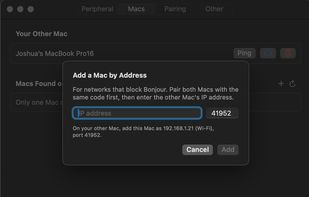
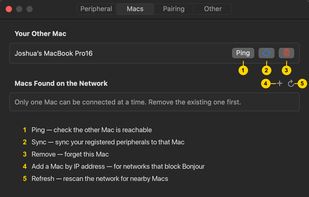
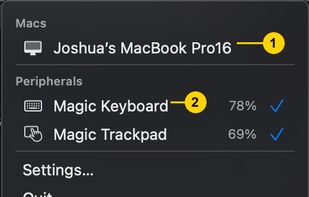
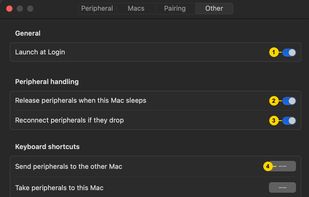
    Magic Switch is a simple macOS menu bar utility that lets you quickly (and securely) switch Magic Keyboard, Magic Trackpad, Magic Mouse, and other Bluetooth peripherals between Macs with one click.

    Cost / License

    Application type

    Since

    • New

    GitHub

    • GitHub stars: 203

    Platforms

    • Mac
    • Homebrew
    • PL flagPoland
    • European Union flagEU
    Magic Switch screenshot 1
    Magic Switch screenshot 2
    Magic Switch screenshot 3
    +6
    Magic Switch screenshot 4
    27 alternatives
  2. Middle icon
     Like

    Add middle click to your Mac.

    Cost / License

    • Pay once
    • Proprietary

    Since

    • Since 2023

    Platforms

    • Mac
    • US flagUnited States
    Middle screenshot 1
    10 alternatives
  3. Scroll 2 icon
     Like

    Limit Magic Mouse Scroll. Scroll with one trackpad touch.

    Cost / License

    • Pay once
    • Proprietary

    Since

    • Since 2023

    Platforms

    • Mac
    • US flagUnited States
    Scroll 2 screenshot 1
    Scroll 2 screenshot 2
    12 alternatives
  4. Jitouch icon
     15 likes

    Jitouch is a software that adds extra, essential, and the missing gestures to your MacBook Multi-Touch Trackpad and the new Apple Magic Mouse.

    Cost / License

    • Free
    • Proprietary

    Since

    • Since 2010

    Alerts

    • Discontinued

    Platforms

    • Mac
    • HK flagHong Kong
    Jitouch screenshot 1
    17 alternatives
  5. WheelClick icon
     1 like

    Middle click for the Mac trackpad: three-finger click or tap, free forever, plus fn+click, Force Click, middle-drag for CAD, autoscroll and per-app rules as a one-time purchase, from the maintainer of MiddleClick.

    Cost / License

    • Freemium (Pay once)
    • Proprietary

    Application type

    Since

    • Since 2026

    Platforms

    • Mac
    • Homebrew
    The whole app is a menu bar menu: four middle-click gestures, each with a measured energy dot.
    Every row opens a card that explains the gesture and shows what it costs, measured on real hardware.
    The Middle-Drag plugin holds a middle-button drag system-wide, so Blender, Fusion, Unity and any app that pans or orbits with the middle button just work.
    +3
    The welcome tour's playground: try three-finger click, fn+click and three-finger tap on mock tabs before trusting them.
    7 alternatives
  6. Tenon icon
     Like

    Tenon makes Apple's Magic Mouse, Magic Trackpad and Magic Keyboard work fully on Windows: smooth inertial scrolling, full multi-finger gestures (with tap and force-click on the trackpad), media and function keys, macOS-style Cmd?Ctrl remapping, and battery levels.

    Cost / License

    • Freemium
    • Proprietary

    Since

    • Since 2026

    Platforms

    • Windows
    Control Panel
    4 alternatives
  7. CalmMouse icon
     Like

    The Magic Mouse's whole top shell is a touch surface, and it stays live while you click. So every click is also a tiny swipe — you press down, your finger rolls half a millimeter, and the page jumps. Drag a window and the document scrolls out from under it.

    Cost / License

    • Free
    • Open Source (MIT)

    Since

    • New

    GitHub

    • GitHub stars: 2

    Platforms

    • Mac
    • US flagUnited States
    01-settings-general
    02-settings-presets
    03-welcome-presets
    7 alternatives