


SmoothScroll
SmoothScroll will give your mouse wheel (Chrome, Word, OneNote, text editors, PDF, etc.) buttery smooth scrolling.

Cost / License
- Subscription
- Proprietary
Platforms
- Mac
- Windows


Features
SmoothScroll News & Activities
Recent News
No news, maybe you know any news worth sharing?
Recent activities
SmoothScroll is simple, lightweight and gets the job done without any extra fluff. It works perfectly with my Logitech mouse -- no bloated Logi Options software in sight. 10/10
- 0xmatt liked SmoothScroll
Been using this app for over 2 years now, it's honestly one of those things where I didn't know I needed it until I found it. Kudos to the dev, super friendly guy haha.
- aryasalt liked SmoothScroll
 deepzz0 added SmoothScroll as alternative to LinguaX
- phonehive liked SmoothScroll
Absolutely a 0/10 crappy app. The owner never mentions about the free trial when you are installing the app. When the trial ends the owner asks for a FAKE review to extend the app’s trial or ask for a yearly payment. Moreover, the app works terribly on Firefox browser. Avoid this useless app 👎🏿👎🏿👎🏿👎🏿👎🏿🙄
 AltSaru added SmoothScroll as alternative to Smoothscroll for Windows
Compared to the alternatives on windows, i think this is best. I've used MouseFix on mac and that has one of the best smooth scroll, and in windows this is the one that i found which gives a similar feel.
- kaua1406 liked SmoothScroll

Licensing
Proprietary and Commercial product.Pricing
Subscription that costs $1 per month.Alternatives
16 alternatives listedBadge
Get an embeddable badge for SmoothScrollSupported Languages


Comments and Reviews
SmoothScroll is listed as Freemium, but it's actually a 21-day trial, followed by an annual fee of €25.10. This should be classified as a Trial, not Freemium, which usually means a permanently free version is available.
SmoothScroll is simple, lightweight and gets the job done without any extra fluff. It works perfectly with my Logitech mouse -- no bloated Logi Options software in sight. 10/10
Been using this app for over 2 years now, it's honestly one of those things where I didn't know I needed it until I found it. Kudos to the dev, super friendly guy haha.
Absolutely a 0/10 crappy app. The owner never mentions about the free trial when you are installing the app. When the trial ends the owner asks for a FAKE review to extend the app’s trial or ask for a yearly payment. Moreover, the app works terribly on Firefox browser. Avoid this useless app 👎🏿👎🏿👎🏿👎🏿👎🏿🙄
Compared to the alternatives on windows, i think this is best. I've used MouseFix on mac and that has one of the best smooth scroll, and in windows this is the one that i found which gives a similar feel.
I’ve been using SmoothScroll for a while now, and honestly, it made a bigger difference than I expected. Before installing it, scrolling with a regular mouse on my Mac felt kind of choppy and inconsistent. After using this app, everything feels much more fluid and natural — especially when browsing long pages or reading.
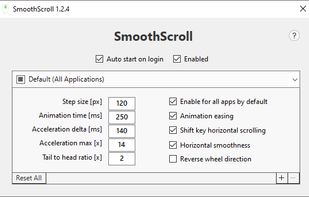
What I like most is how simple it is. You don’t need to spend a lot of time tweaking settings, but if you want to, there’s enough customization to get it just right. It really feels like the kind of smooth experience you’d expect natively.
Honestly the only app that got the smoothing scroll animation to work with my Logitech mouse. Ghub and Logioption both failed.