





WinCleanCat
1 like
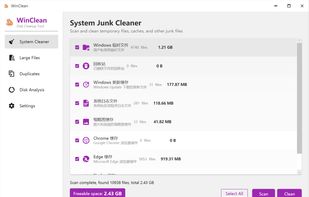
Free, open-source Windows disk cleanup tool. Clean system junk, scan large files, detect duplicates, and analyze disk space. Single portable file under 70MB. No ads, no bundleware, no background processes. Built with .NET 8 + WPF. Supports 6 languages and 10+ themes.

Cost / License
- Free
- Open Source (MIT)
Application typeApplication types
Platforms
- Windows


Features
WinCleanCat News & Activities
Highlights All activities
Recent activities
 sarmadhussainch added WinCleanCat as alternative to Dusty Storage
 solaris09 added WinCleanCat as alternative to Smart Cleaner AI
Extremely basic cleaning tool, with a mediocre scanning algorithm. I compared it with some other cleaning tools, others found 60-90gb of junk total this one only found 4gb worth of junk. In addition not everything is properly translated into English, the scanning results were all in Chinese despite me selecting the English language.
There are better Open Source alternatives with the bonus of not being from China either.
 Paul added WinCleanCat as alternative to CleanMyLinux
 Paul added WinCleanCat as alternative to Cache Out
 Emma Grosch added WinCleanCat as alternative to TidyBar
 Danilo Venom added WinCleanCat as alternative to optimizerDuck
 MahirGunduz added WinCleanCat as alternative to Disk Mop
 anuraj-0 added WinCleanCat as alternative to DeepClean
 deepcleanmac added WinCleanCat as alternative to DeepCleanMac


WinCleanCat information
Developed by
 shaoyidi
 Licensing
Open Source (MIT) and Free product.Written in
Alternatives
63 alternatives listedBadge
Get an embeddable badge for WinCleanCatSupported Languages

AlternativeTo Categories
OS & Utilities, System & Hardware, File ManagementGitHub repository
- 8 Stars
- 0 Forks
- 0 Open Issues
- Updated


Featured in Lists



My Favorites
A list with 81 apps by ballju without a description.
Comments and Reviews
Extremely basic cleaning tool, with a mediocre scanning algorithm. I compared it with some other cleaning tools, others found 60-90gb of junk total this one only found 4gb worth of junk. In addition not everything is properly translated into English, the scanning results were all in Chinese despite me selecting the English language.
There are better Open Source alternatives with the bonus of not being from China either.