Smart Cleaner AI: Disk Clean is a comprehensive Mac cleanup and storage review app designed to help you inspect cache files, logs, duplicate files, duplicate photos, screenshot files, large files, installed apps, browser data, startup items, and accessible cloud folders in one place.
As a versatile disk utility, the app helps you analyze storage, review common cleanup areas, and safely remove only the items you choose. All file sizes and cleanup suggestions are based on accessible files, selected folders, and available macOS data.
SMART DISK CLEANUP & CACHE REVIEW
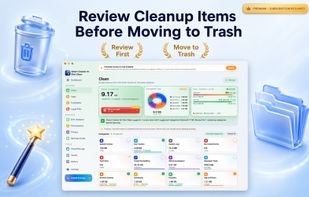
Smart Cleaner AI: Disk Clean scans common cleanup locations such as app caches, user caches, system logs, Trash bins, downloads, mail attachments, browser history, and developer files. You can inspect all found items before choosing to move them to the Trash.
STORAGE ANALYZER & DISK SPACE REVIEW
Browse storage usage from accessible folders and disk locations. Review large files, old files, duplicate folders, and other items that may consume valuable disk space over time.
AI-GUIDED CLEANUP SUGGESTIONS
Smart Cleaner AI: Disk Clean can highlight specific files and categories for review. Smart suggestions are provided to help you decide what to inspect, while file removal remains entirely under your control.
DUPLICATE FILES & PHOTOS CLEANER
Find exact duplicate files, folders, and photos in selected and accessible locations. Compare copies side-by-side, find screenshots, and choose which duplicates to keep or remove to reclaim disk space easily.
APP REVIEW & UNINSTALLER
Review installed applications and identify related support files, caches, preferences, and leftovers. View the complete disk footprint of apps before uninstalling selected items.
VISUAL DISK ANALYZER
Explore file and folder sizes with interactive, visual storage browsing. Review accessible categories such as Applications, Photos, Developer files, Documents, Mail, and Downloads.
LARGE FILE FINDER
Locate large files, archives, developer caches, application data, and media files from accessible folders to easily identify what is taking up your Mac's storage.
STARTUP ITEMS & LOGIN MANAGER
Review startup items, launch agents, daemons, and background services. Open related system settings and manage startup programs with user confirmation to keep your login flow organized.
BROWSER PRIVACY & CACHE REVIEW
Review browser history, cookies, caches, and recent data from supported web browsers. Safely remove selected items when they are no longer needed.
SECURITY SETTINGS CHECKLIST
Use an interactive checklist to review common macOS security settings such as FileVault, Firewall, Gatekeeper, Remote Login, and software updates. Get direct guidance and links to Apple system settings where available.
CLOUD STORAGE REVIEW
Review accessible local cloud folders, local file copies, and cached cloud data. Manage selected local files while maintaining full control over what remains in the cloud.







 solaris09 added Smart Cleaner AI as alternative to CCleaner, Canta, AppCleaner, Mole and 47 more


 DijitalWorlds


No comments or reviews, maybe you want to be first?