Stats Alternatives

Stats is described as 'Simple macOS system monitor in your menu bar' and is a system information utility in the system & hardware category. There are more than 50 alternatives to Stats for a variety of platforms, including Mac, Windows, Linux, iPhone and iPad apps. The best Stats alternative is HWiNFO (32/64). It's not free, so if you're looking for a free alternative, you could try HWiNFO (32/64) or Open Hardware Monitor. Other great apps like Stats are SpeedFan, Sidebar Diagnostics, iStat Menus and Core Temp.

Copy a direct link to this comment to your clipboard
Stats alternatives page was last updated

Alternatives list

  1. GOverlay icon
     8 likes
    Copy a direct link to this comment to your clipboard

    GOverlay is an opensource project that aims to create a Graphical UI to help manage Linux overlays.

    Cost / License

    • Free
    • Open Source

    Platforms

    • Linux
     
  2. BitBar icon
     13 likes
    Copy a direct link to this comment to your clipboard

    The BitBar app lets you put the output from any script or program right in your Mac OS X menu bar. And it's completely free. An impressive number of plugins have already been contributed by a wide range of developers just like you, and this site makes it easy to find them.

    35 BitBar alternatives

    Cost / License

    • Free
    • Open Source

    Platforms

    • Mac
     
  3. Mangojuice icon
     3 likes
    Copy a direct link to this comment to your clipboard

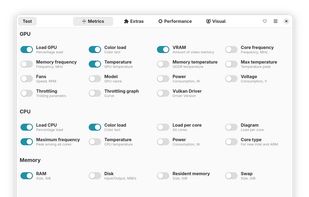
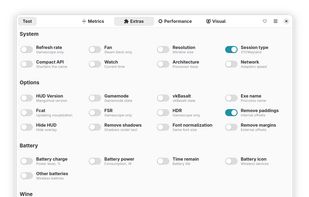
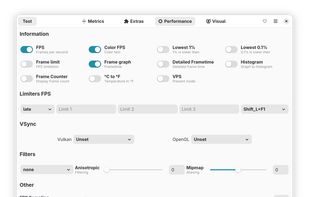
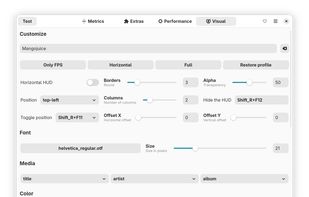
    This program will be a convenient alternative to GOverlay for setting up MangoHUD.

    Cost / License

    • Free
    • Open Source

    Platforms

    • Linux
    • Flathub
    • Flatpak
     
  4. iGlance icon
     7 likes
    Copy a direct link to this comment to your clipboard

    iGlance is a small system monitor that displays current stats about your Mac on the menu bar. It is built to be highly customizable so that everyone can adjust it to his/her needs. A full list of all the features is below.

    Cost / License

    • Free
    • Open Source

    Alerts

    • Discontinued

    Platforms

    • Mac
     
  5. Atmonitor icon
     21 likes
    Copy a direct link to this comment to your clipboard

    Mac OS X System Monitor and Process Explorer Tool atMonitor is the most advanced monitoring tool for Mac OS X that displays system activity in real-time. It is designed to allow quick assessment of computers state and it is powerful enough to make it a core utility in anyones sys.

    Cost / License

    • Free
    • Proprietary

    Alerts

    • Discontinued

    Platforms

    • Mac
     
  6. Copy a direct link to this comment to your clipboard

    Activity Monitor displays information about all the processes running on your Mac, including CPU, disk, memory, and network usage. You can see exactly how your computer’s resources are being used via a searchable table, helpful graphs, or even directly in the Dock icon.

    22 Activity Monitor alternatives

    Cost / License

    • Free
    • Proprietary

    Platforms

    • Mac
     
  7. iPulse icon
     5 likes
    Copy a direct link to this comment to your clipboard

    Using its concise and appealing user interface, iPulse graphically displays the inner workings of OS X on your desktop, menu bar or Dock.

    Cost / License

    • Paid
    • Proprietary

    Platforms

    • Mac
     
  8. Monity icon
     1 like
    Copy a direct link to this comment to your clipboard

    Monity is an advanced system monitor that takes place in macOS Today View and oversees component statistics.

    Cost / License

    • Pay once
    • Proprietary

    Platforms

    • Mac
     
  9. Copy a direct link to this comment to your clipboard

    GST is a GTK system utility designed to stress and monitor various hardware components like CPU and RAM.

    Cost / License

    • Free
    • Open Source

    Application type

    Platforms

    • Linux
     
  10. Corsair Link icon
     3 likes
    Copy a direct link to this comment to your clipboard

    Corsair Link Dashboard software allows you to monitor your system and gives remarkable control over your case fans, lighting, and compatible Corsair power supplies and Hydro Series liquid CPU coolers that work together for optimal cooling and etc.

    Cost / License

    • Free
    • Proprietary

    Platforms

    • Windows
     
  11. Copy a direct link to this comment to your clipboard

    MenuBar Stats 2 has been reinvented. Completely re-written from the ground up. MenuBar Stats 2 is composed of modules (CPU, Disk, Network,...). Each module can be seen in your menu bar. Each module can be combined in 1 window, or in a separated window.

    Cost / License

    • Pay once
    • Proprietary

    Platforms

    • Mac
     
You are at page 2 of Stats alternatives