smcFanControl is the perfect application for all those Macbook owners getting burned by their hot-running Macbook.
Cost / License
- Free Personal
- Open Source
Alerts
- Discontinued
Platforms
- Mac

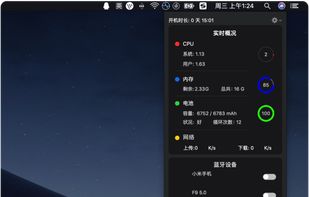
Stats is described as 'Simple macOS system monitor in your menu bar' and is a system information utility in the system & hardware category. There are more than 50 alternatives to Stats for a variety of platforms, including Mac, Windows, Linux, iPhone and iPad apps. The best Stats alternative is HWiNFO (32/64). It's not free, so if you're looking for a free alternative, you could try HWiNFO (32/64) or Open Hardware Monitor. Other great apps like Stats are SpeedFan, Sidebar Diagnostics, iStat Menus and Core Temp.
smcFanControl is the perfect application for all those Macbook owners getting burned by their hot-running Macbook.

HWRadar is a simple lightweight and customizable hardware monitoring tool that offers real-time, detailed insights into your computer's performance. Our software can track numerous hardware parameters and exports this data in various formats like PNG, PDF, CSV, DOC, and HTML.


Fanny is a free Notification Center Widget and Menu Bar application to monitor your Macs fans.

EasyTune presents a convenient, Windows-based system performance enhancement and management utility. It features tools such as:
ZetaWatch is a small OS X program that displays the zfs status in the menu bar, similar to what iStat Menus does for other information. It is fairly well tested, but due to the current state of libzfs and libzfs_core, changes will be required until the API stabilizes.

Stater is an application that displays system parameters (i.e. CPU, memory, and drive space usage charts), directly in the dock icon. Besides four icon views, the dock menu contains detailed information about CPU, memory, drive space usage, and top processes.


Your iPad and iPhone show you when apps are using your network. So why can't your Mac? Sure, there's always the Network section in Activity Monitor, but that's far from ideal. At best you can group by All Processes, Hierarchically, sort by Rcvd Bytes, and check the...

Penteract Taskbar Resource Meter™ lets you keep an eye on your computer's resource usage even when using a program maximized.


MiniUsage displays various data like CPU usage, amount of network flow, battery status and process names which uses much CPU time in a menubar. It takes little space and can display various data, so it's suitable for notebook.


The Logitech Arx Control™ app connects with Logitech Gaming Software to give you exclusive in-game display information, vital systems statistics, and PC remote control functions that extend the PC Gaming experience to your mobile device.


XRG is an open source system monitor for Mac OS X. XRG allows you to monitor CPU activity, memory usage, battery status, machine temperature, network activity, disk I/O, current weather, and stock market data.