




Overcaption
5 likes
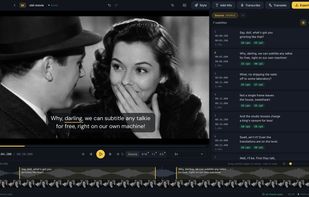
Create, edit, and translate subtitles offline on macOS or Windows. Features on-device Whisper-class speech recognition, language-aware post-processing, waveform timeline, keyboard shortcuts, compliance checks, SRT/VTT export, and watermark-free burn-in. No uploads required.

Cost / License
- Freemium (Pay once or Subscription)
- Proprietary
Application typeApplication types
Platforms
- Online


Features
Overcaption News & Activities
Highlights All activities
Recent activities
- Abdullah-3468 liked Overcaption
 overcaption added Overcaption as alternative to Kapwing
 editlabtools added Overcaption as alternative to CaptionLab
- Maoholguin added Overcaption as alternative to Shortsly
- CyberB0rg liked Overcaption
- Andr-s-Vel-squez liked Overcaption
- Nicolas-HA liked Overcaption
- overcaption added Subtitle Editor as a feature to Overcaption
- overcaption liked Overcaption


Overcaption information
Developed by
OvercaptionLicensing
Proprietary and Freemium product.Pricing
One time purchase and / or subscription + free version with limited functionality.Alternatives
23 alternatives listedBadge
Get an embeddable badge for OvercaptionSupported Languages


No comments or reviews, maybe you want to be first?