
Burncaps icon
Burncaps icon

Burncaps

Burncaps adds animated, word-by-word captions to a talking video and gives you back one MP4. Drop an MP4 or MOV of up to ten minutes and choose what you get: the whole video with captions burned in and nothing cut, or the best 30 or 60 seconds as a vertical 1080x1920 short with...
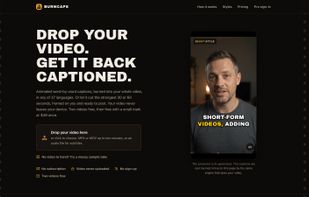
The home page: the live demo burns captions into a take in the browser (the presenter is AI-generated, the captions are real).

Cost / License

  • Freemium (Pay once)
  • Proprietary

Application type

Platforms

  • Online
0likes
0articles
Save

Features

Properties

  1.  Privacy focused
  2.  AI-Powered

Features

  1.  Hardware Accelerated
  2.  No registration required
  3.  Ad-free
  4.  Live Preview
  5.  Speech Transcription
  6.  Subtitles and captions
  7.  Automated Captions

Burncaps News & Activities

Highlights All activities

Recent activities

Burncaps information

  • Developed by

    GB flagJordan Labs
  • Licensing

    Proprietary and Freemium product.
  • Pricing

    One time purchase (perpetual license) + free version with limited functionality.
  • Alternatives

    10 alternatives listed
  • Badge

    Get an embeddable badge for Burncaps
  • Supported Languages

    • English

AlternativeTo Categories

Video & Movies, System & Hardware
Burncaps was added to AlternativeTo by JOrdaN-Labs on and this page was last updated .

No comments or reviews, maybe you want to be first?

What is Burncaps?

Burncaps adds animated, word-by-word captions to a talking video and gives you back one MP4. Drop an MP4 or MOV of up to ten minutes and choose what you get: the whole video with captions burned in and nothing cut, or the best 30 or 60 seconds as a vertical 1080x1920 short with filler words and dead air removed.

The video never leaves your browser. The picture and the export are made on your own computer or phone, and you can check this in your browser's developer tools. The sound goes to our speech service only if you choose it, for faster listening.

What you get:

  • 20 caption styles, each word highlighted as it is spoken
  • An editable transcript: click any word to correct it, and fix every other occurrence in one click
  • Captions in the language spoken, including 12 Indian languages, or translated into any of 37 languages
  • Backgrounds: soft blur, studio colours, your own picture, or a green screen
  • Vertical, square, 4:5 or the original shape, with the frame following your face
  • SRT, VTT and ASS subtitle files, free for recordings up to ten minutes
  • Longer recordings, up to 90 minutes on a computer: the script and subtitle files, the first ten minutes free and all of it with Pro (captions burned into video stay at ten minutes)

Pricing: free to use, with every feature and no account: five videos every 30 days, the first two with no mark, or $49 once for unlimited videos with none. No subscription. Made by Jordan Labs Ltd in the UK.
