CaptionLab is a Premiere Pro plugin that creates subtitles directly on your timeline without the need for cloud uploads, subscriptions, or API keys. It functions offline on Mac or Windows systems and supports 99 languages. Unlike other subtitle tools that require server uploads and subscription fees, CaptionLab is fully integrated within Adobe Premiere Pro. Users can generate editable captions within a minute, all offline. It doesn't require cloud storage, API keys, account creation, or monthly payments. It uses OpenAI's Whisper model, which supports many languages not yet supported by Adobe's Speech-to-Text tool.
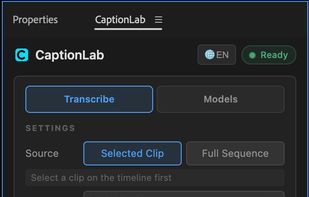
CaptionLab operates 100% offline, ensuring your footage stays on your personal computer, making it suitable for NDA work. It's not a browser tab or standalone app but a genuine Premiere Pro plugin. It doesn't have subscription fees or per-minute charges and provides 99 languages for speech-to-text, powered by OpenAI Whisper. Users can auto-detect the spoken language or manually select it. The software also offers translation from any language to English with a single click. Other features include selected clip or full sequence modes, word-level timestamps for precise caption segmentation, and multi-clip support. It runs natively on Apple Silicon (M1–M4) and Intel Macs, and also on Windows 10/11, where it will automatically utilize NVIDIA GPU Acceleration if available, allowing for processing speeds up to 10x faster than CPU-only processing.
CaptionLab provides word-by-word captions with a caption length control feature that allows users to determine the exact number of words per caption (between 1 to 8), ideal for the pop-on-screen style. Users can also choose their AI model from the new Models tab, offering the ability to switch between Large-v2, Large-v3, Large-v3-turbo (~6x faster), or Small right from the panel. The models can be downloaded, switched, or deleted at any time, with live progress and disk usage displayed.
Unlike cloud subtitle tools that require your footage on their servers and a card on file, CaptionLab operates entirely locally, within the app you're already editing in, with no uploads or subscriptions necessary, making it a more private and cost-effective subtitling tool.







 editlabtools added CaptionLab as alternative to Adobe Premiere Pro, Descript, HappyScribe, Whisper and 8 more

 Edit Lab Tools / Igor Bondarenko

No comments or reviews, maybe you want to be first?