
Substrike icon
Substrike icon

Substrike

 Like

Captions your gaming clips on your PC, each voice in its own colour, ready for Shorts, TikTok and Reels. Great for video podcasts and talking videos too.
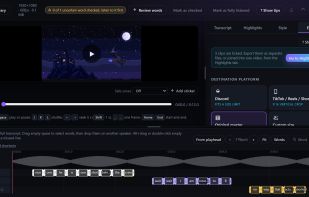
The editor: captions timed word by word on the clip, with each speaker on their own track and export options for TikTok, Shorts, Reels and Discord.

Cost / License

  • Pay once
  • Proprietary

Application type

Platforms

  • Windows  Tested on Windows 11. Needs 8 GB RAM.
0likes
0articles
Save

Features

Properties

Features

Highlights All activities

Substrike News & Activities

Recent activities

Substrike information

  • Developed by

    AU flagChrono X
  • Licensing

    Proprietary and Commercial product.
  • Pricing

    One time purchase (perpetual license) ranging between $29 and $39.
  • Alternatives

    9 alternatives listed
  • Badge

    Get an embeddable badge for Substrike
  • Supported Languages

    • English
    • Spanish
    • Portuguese
    • Japanese
Substrike was added to AlternativeTo by Chronox2290 on and this page was last updated .

No comments or reviews, maybe you want to be first?

Official Links

What is Substrike?

Substrike is a Windows app that turns recorded gaming clips into captioned, ready to post videos. Point it at the folder your recorder saves to (OBS, NVIDIA ShadowPlay, Steam, Medal or any app that saves video) and every new clip is captioned automatically as you save it.

Captions are timed word by word, each person in voice chat gets their own colour, and clips export cropped to 9:16 for Shorts, TikTok and Reels. There are seven caption styles, including Living captions that move with whoever is talking, plus SRT export for finishing the edit in Resolve or Premiere.

Everything runs on your own PC. Nothing is uploaded. One time purchase, no subscription, with a free 7 day trial and no card needed.

Substrike Videos
