NeverWrite icon
NeverWrite icon

NeverWrite

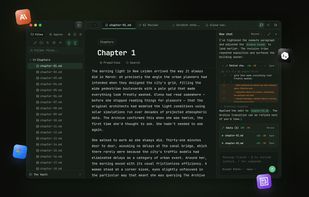
NeverWrite is a local-first knowledge workspace for people who need to handle workflows with multiple parallel agents and subagents. Built like a code editor, but for markdown. It has inline review changes, like Cursor and others.
NeverWrite screenshot 1

Cost / License

Platforms

  • Mac
  • Windows
  • Google Chrome
  • Mozilla Firefox
0likes
0comments
0articles

Features

Properties

  1.  Support for Themes
  2.  Privacy focused

Features

  1.  Live Preview
  2.  Web Clipper
  3.  No registration required
  4.  Dark Mode
  5.  Syntax Highlighting
  6.  Support for MarkDown
  7.  Spell Checking
  8.  Ad-free
  9.  Works Offline
  10.  No Tracking
  11.  Knowledge Base
  12.  Knowledge Management
  13.  Split-screen view
  14.  Built-in Image viewer
  15.  Built-in terminal emulation
  16.  AI-Powered
  17.  Multi panel
  18.  AI Writing
  19.  Markdown preview
  20.  Integrated PDF Viewer
  21.  Electron based

NeverWrite News & Activities

Highlights All activities

Recent activities

NeverWrite information

AlternativeTo Categories

Office & ProductivityAI Tools & ServicesEducation & Reference

GitHub repository

  •  288 Stars
  •  37 Forks
  •  4 Open Issues
  •   Updated  
View on GitHub

Popular alternatives

View all
NeverWrite was added to AlternativeTo by Paul on and this page was last updated .
No comments or reviews, maybe you want to be first?

What is NeverWrite?

NeverWrite is a local-first knowledge workspace for people who need to handle workflows with multiple parallel agents and subagents. Built like a code editor, but for markdown. It has inline review changes, like Cursor and others.

How it works

AI that respects your intent. NeverWrite keeps the human in the loop from the first draft to the final revision.

  1. Write naturally in Markdown: Create and organize your notes in Markdown. Use the editor, file tree, and tags to build your knowledge base.
  2. AI suggests, you review each change: Let AI propose edits, reorganize content, or generate ideas. Every suggestion goes through your review first.
  3. Accept, reject, or refine with full control: See exactly what changed. Accept or reject each modification individually. Full diff view, inline review, total control.

Key features:

Everything you need to think clearly. A focused writing environment, reviewable AI, and enough structure to keep your notes usable as your vault grows.

  • AI-Powered Editing: AI suggests changes you review before applying. Accept, reject, or modify one change at a time.
  • Local-First Privacy: Your data stays on your machine. Always. No cloud sync, no telemetry, no tracking.
  • Multi-pane first experience: Work with several files, AI sessions, and tools side by side. Split, drag, and arrange panes to match how you think.
  • Multi AI Runtime: Open as many native sessions as you need with Codex, Claude, Gemini, and Kilo. Use the right model for the right task.
  • Graph Visualization: See connections between your notes in 2D and 3D. Visualize the big picture.
  • Concept Maps: Excalidraw-powered whiteboard for visual thinking and brainstorming.
  • Advanced Search: Query builder for powerful full-text search. Filter by content, tags, dates, and more.
  • Wikilinks: Link notes together with [[wikilink]] syntax. Smart autocomplete suggests matches as you type.
  • Markdown Live Preview: Write in Markdown and see it render in real time, side by side.
  • Web Clipper: Save web pages directly to your vault. Clip articles, references, and research with one click.
  • Integrated Terminal: Run commands without leaving your workspace. A built-in terminal right where you need it.
  • Syntax Highlighting: Built-in support for 47 programming languages. Write and read code blocks with full highlighting.
  • 22 Visual Themes: Make it yours. Dark, light, and everything in between.
  • Image Viewer: Preview and resize images directly inside your notes. Drag, drop, or paste from clipboard.
  • PDF Viewer: Read PDFs directly in your workspace. Navigate, zoom, search text, and apply visual filters like dark mode and sepia.
  • Spell & Grammar Check: Multi-language spell checking with optional grammar verification. Add custom dictionaries for your workflow.

Official Links