notekpr icon
notekpr icon

notekpr

 Like

The last note-taking application you will ever need, where obsidian meets notion. Private, self-hostable and agent friendly.
notekpr screenshot 1

Cost / License

  • Freemium (Subscription)
  • Open Source (AGPL-3.0)

Application type

Since

  • New

Updated

  • Updated Nov 2026

Platforms

  • Windows  Command line only
  • Mac  Command line only
  • Linux  Command line only
  • Self-Hosted
  • Docker
0likes
0articles
Save

Features

Properties

Features

Highlights All activities

notekpr News & Activities

Recent activities

notekpr information

AlternativeTo Category

Office & Productivity

GitHub repository

  •  5 Stars
  •  0 Forks
  •  0 Open Issues
  •   Updated  
View on GitHub

Popular alternatives

View all
notekpr was added to AlternativeTo by Paul on and this page was last updated .

No comments or reviews, maybe you want to be first?

Official Links

What is notekpr?

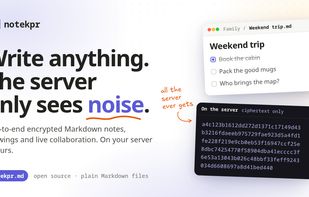
A self-hosted, open-source, local-first Markdown knowledge base: Obsidian's plain-Markdown philosophy and offline access, Notion's friendly interface and real-time collaboration — with end-to-end encryption so the server can't read anything.

  • Private by design — notes, file names, folders, attachments and history are encrypted on your devices. The server stores ciphertext and coordinates.
  • Collaborative — share vaults with family or colleagues as editor or viewer; edit the same note simultaneously with live cursors. Conflict-free merging (CRDTs), also after working offline.
  • Plain Markdown — wiki links, backlinks, tags, embeds, export to a folder of .md files at any time.
  • Use your own editor — the CLI keeps your vaults as a plain folder of Markdown files, synced live and both ways: edit with Obsidian, Neovim, VS Code or anything else while the server only stores ciphertext (how).
  • Easy for everyone — sign in with your existing identity provider (OIDC), one click to set up encryption, a clean editor with a formatting toolbar.
  • For AI agents too — give an agent its own identity and keys, share only the vaults it needs; it works with notes through the CLI, a folder of Markdown files, or a local HTTP gateway.
  • Rust everywhere — the server, the CLI and the browser client (compiled to WebAssembly) share one core crate for all cryptography and syncing. No npm, no third-party JavaScript.

Features:

  • Writing — a live-preview Markdown editor with a toolbar, tables, task lists, code blocks, callouts, colors, images, video and audio; optional Vim keys.
  • Drawings — a whiteboard among your notes, drawn together live and shown in any note; compatible with Excalidraw: copy and paste, its files and Obsidian's.
  • Organizing and finding — folders with drag and drop, icons, a quick switcher, full-text search, backlinks, a graph, quick notes, a trash and every note's history.
  • Working together — share a vault or a single note, edit together with live cursors, comment and @mention.
  • Privacy and security — a key for every note, signed membership and edits, new devices approved from one you already use.
  • Offline, and your own tools — works offline; the CLI does everything and keeps your vaults as a folder of Markdown files; import (Markdown, Obsidian, Notion) and export.
  • For AI agents — their own identity, only the vaults you share, through the CLI, files or an HTTP gateway.
  • Running it — one Rust server with SQLite, attachments in S3 or a folder, an admin page, limits and metrics.