


KDE Connect
436 likes
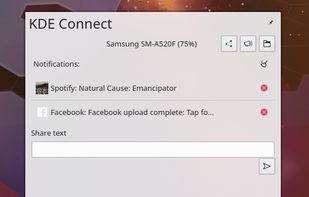
Empowers seamless interaction between devices, offering notifications, SMS replies, music control, file sharing, volume control, secure connections, and cross-platform compatibility.

Cost / License
- Free
- Open Source (GPL-3.0)
Application typeApplication types
 EU
EUPlatforms
- Mac
- Windows
- Linux
- Android
- iPhone
- Android Tablet
- HUAWEI AppGallery
- iPad
- KDE Plasma
- F-Droid
- Sailfish OS
- Plasma Mobile
- Chocolatey
- OpenAPK


Features


Highlights All activities
KDE Connect News & Activities
Recent News
- Fla published news article about Linux Lite
- Paul published news article about KDE Connect


Recent activities
 Yashwanthvm06 added KDE Connect as alternative to AirDesk
 zynk added KDE Connect as alternative to Zynk File Transfer
- Alexander Menzel liked KDE Connect
 TheEmperorArt added KDE Connect as alternative to iReaShare Android Manager, MobiKin Assistant for Android and Coolmuster Android Assistant
- humble-advisor liked KDE Connect
 Fayeed added KDE Connect as alternative to Clypy
 Abdullah Shahid added KDE Connect as alternative to ShareByWiFi
 Mudit07 added KDE Connect as alternative to LocalTV Remote
 Paul added KDE Connect as alternative to Sill
- Sithu A liked KDE Connect


The ultimate F-Droid setup (300+ Apps)
WHAT IS F-DROID ?
F-Droid is an awesome app repository for FOSS (Free & Open Source Software) android apps. From productivity apps to games, f-droid has (almost) everything you need.
Hope you will discover useful FOSS apps to free your phone from Big Tech^^
REPOSITORIES :
This list includes apps from the official f-droid repo but also from IzzyOnDroid and some customs repositories which will be always linked so you can add them easily.
CATEGORIES :
F-Droid clients
Utilities
Social & Communication / 8 subcategories
Health / 7 subcategories
Customization / 3 subcategories
Gaming / 3 subcategories
Internet / 6 subcategories
Productivity / 15 subcategories
Privacy / 5 subcategories
Security / 4 subcategories
Media apps / 10 subcategories
If you care about privacy check :
Privacy focused OS for everyone
My privacy and user friendly setup
For more FOSS Android apps check : Beautiful Open Source Apps for Android
DISCLAIMERS :
Adding custom repo might not be as secure as the official one so I'm not responsable if you encounter any problems with them ! I encourage you to do your own research about it !
Also while open source is great for privacy and security it is not perfect. So keep that in mind before downloading any apps.
Most apps that I've listed are privacy friendly but some might be not be perfectly private and secure. I again encourage you to do your own research about them.
I am not a privacy and security expert. I'm also don't consider myself as a developper so I do not have any technical knowledge and so I didn't look into any source code of any apps in this list !
English is not my mother tongue ^^'



The Windows setup for everyone (with freeware only) Will make Windows suck less
This is the apps for Windows 11 that I would recommend to anyone who just got a PC !
The same list for
macOS :
Linux kernel (GUI apps only) :


Interesting and open-source Android apps
A list of interesting and open source Android apps.
Official Links



Install from the command line
winget install -e --id KDE.KDEConnectbrew install --cask kde-connect
Developed by
 KDE
KDE Licensing
Open Source (GPL-3.0) and Free product.Rating
Average rating of 4.3Alternatives
121 alternatives listedBadge
Get an embeddable badge for KDE ConnectSupported Languages
AlternativeTo Categories
Social & Communications, Security & Privacy, OS & Utilities, File Sharing, Office & ProductivityApple AppStore
- Updated
- 4.21 avg rating


Comments and Reviews
Easy and seamless way to integrate your Android phone with Linux desktop. Completely free (as in money AND as in freedom), lets you see your notifications on PC, receive and send SMS, control media playback, share files, emulate mouse and keyboard input with phone touchscreen and more!
The desktop application is ok. It lacks UX, and the iPhone application as of Dec 2023 is unusable, because it requires to be on foreground and it has just a bunch of basic features implemented. It's very rough around the edges.
You said its ok, why did you give it 1 star?
@PearOfJudes for everything I said after that...
80`s look. 0 functionality.
The best way to connect linux and android. Makes it seem like a cohesive ecosystem while not locking down your choice in terms of OS or devices.
A really good tool that I use for … just remote mouse control, playing/pausing multimedia, or mobile notifications and the ability to reply to them. For everything else – whether it’s contacts, the calendar, text messages, calls or files on the mobile – I use MyPhoneExplorer, which, although it’s proprietary software, is (as far as I can tell) developed solely by a German developer in his spare time. I believe I’ve understood that KDE Connect was actually designed to turn the mobile into a ‘remote control’ for the PC. Even file transfers are a right faff. I don’t understand how to do it via Wi-Fi, so I can only do it via Bluetooth.
Has a basic set of functions, great for file sharing, you can pair your mobile devices with one another, perfect if you don't need anything else. Is intended for use with your own devices. calling it a remote control tool is a bit of an overstatement as it has no screen mirroring.
KDE Connect does basically anything you could want between any two devices you have. For example, I use the "Share Input Devices" plugin to share my mouse and keyboard across two different desktops over the network; no separate app required! Like many KDE apps, the UI isn't that great, but it does what I need.