AirDesk icon
AirDesk icon

AirDesk

Turn your Android phone into an ultra-low-latency wireless trackpad, keyboard, and Xbox 360 controller for Windows PC over local Wi-Fi.
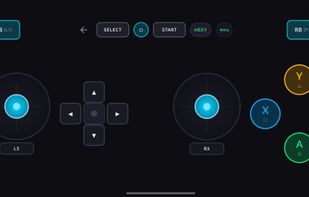
virtual x box 360 gamepad

Cost / License

Platforms

  • Windows  Supports Windows 10 & 11 (64-bit). Portable standalone executable (no installation or .NET runtime setup required). Optional ViGEmBus driver support for genuine Xbox 360 controller emulation.
  • Android  Requires Android 8.0 (Oreo) or higher. APK available directly from GitHub Releases. Works with standard touchscreens and includes haptic vibration feedback.
0likes
0articles
Save

Features

Properties

Features

Highlights All activities

AirDesk News & Activities

Recent activities

AirDesk information

AlternativeTo Categories

Network & Admin, OS & Utilities, Remote Work & Education

GitHub repository

  •  0 Stars
  •  0 Forks
  •  0 Open Issues
  •   Updated  
View on GitHub
AirDesk was added to AlternativeTo by Yashwanthvm06 on and this page was last updated .

No comments or reviews, maybe you want to be first?

Official Links

What is AirDesk?

AirDesk is a free, lightweight, and open-source wireless controller suite for Windows 10 & 11 and Android. It lets you turn your phone into a precision touchpad, full desktop keyboard, media remote, and native Xbox 360 controller with zero subscription paywalls, no full-screen ads, and no cloud accounts.

Key Features: • Multi-Touch Precision Trackpad: Smooth cursor movement, two-finger scroll, left/right clicks, and drag-and-drop. • Full PC Keyboard & Shortcuts: Complete typing input with modifier keys (Ctrl, Alt, Shift, Win) and instant shortcut triggers (Alt+Tab, Task Manager, Copy/Paste). • Native Xbox 360 Controller Emulation: Integrated ViGEmBus support allows Steam, Game Pass, and PC games to recognize your phone as a genuine physical Xbox controller with dual thumbsticks, triggers, and haptic rumble. • Media Remote: Control volume, play/pause, next/previous tracks, and system mute from anywhere in the room. • 100% Local & Private: Operates exclusively over your local Wi-Fi router via low-latency WebSockets. No cloud telemetry, no accounts required, and works completely offline. • Lightweight & Portable: The Windows companion is a self-contained single executable that requires no installation or background bloatware.