ImageForge makes your images smaller — without ever touching quality unless you ask. One native, blazing-fast Mac app for the whole job: lossless compression by default, modern-format conversion, reusable profiles, and hands-off automation. Everything runs 100% on your Mac. Nothing is ever uploaded.
LOSSLESS BY DEFAULT
Drop in a folder and ImageForge rewrites every image smaller using the best lossless tool for each format — oxipng, zopfli, jpegtran, libwebp and more. The output is pixel-identical, just lighter. Lossy is always an explicit, informed choice with a live quality preview — never a silent default.
SEVEN FORMATS, ONE ENGINE
• JPEG — lossless via jpegtran, or lossy with quality, subsampling & progressive
• PNG — oxipng + zopfli, optional palette quantization & dithering
• GIF — lossy levels, color reduction, inter-frame optimization
• WebP — lossless or lossy with quality & effort control
• SVG — strip metadata, collapse groups, minify, round coordinates
• AVIF — quality, effort and bit-depth control; modern and very small (Pro)
• HEIC — Apple-native modern format, compress & convert (Pro)
FORMAT CONVERSION
Turn a folder of PNGs into WebP, or HEIC into JPEG, with clear output naming and an honest signal of when a conversion is lossy versus lossless.
100% ON YOUR MAC — PRIVATE BY DESIGN
No network is ever required. No account, no cloud, no telemetry. The Rust engine runs entirely on-device, so sensitive images never leave your machine — and it works fully offline. EXIF and GPS are stripped by default; keep your color profile when you need it.
YOUR ORIGINALS, YOUR RULES
Overwrite in place, keep a copy with a -min suffix, or write to a separate folder. ImageForge never destroys an original without explicit consent.
REUSABLE PROFILES (PRO)
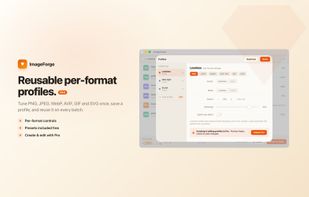
Dial in per-format settings once, save them as a named profile, and reuse them across every batch. Export and import profiles to share a house style across a team.
WATCH FOLDERS & AUTOMATION (PRO)
Set a folder to watch and ImageForge compresses every file the moment it lands — no clicks. A menu-bar item keeps quick actions one shortcut away, so optimizing becomes part of your workflow.
FREE VS PRO
Free covers lossless JPEG, PNG, GIF, WebP and SVG, basic lossy, batch processing and metadata stripping — with no daily limits. Pro (one-time unlock, no subscription) adds:
• Unlimited custom profiles & full per-format control
• AVIF & HEIC output
• RAW import & conversion
• Watch folders with a menu-bar item
No subscription. No cloud. One honest, one-time unlock.
Make your next batch of images lighter — effortlessly.







 EU
EU


 dcarrero added ImageForge as alternative to ImageOptim, ImageMagick, Caesium Image Compressor and FileOptimizer
 Color Vivo Internet, SL


No comments or reviews, maybe you want to be first?