Misuro brings your images to just the right size, in a moment.
FASTER THAN A PROMPT
No photos to upload to a chat, no instructions to write, no files to download one by one. Drop, pick, export: pixel-exact sizes, originals untouched, and your images never leave your Mac.
Three steps, no fuss:
- Drop photos or whole folders into the window.
- Pick a ready-made preset or your own size and check the result in the preview.
- Export. Your originals stay untouched.
FOUR WAYS TO RESIZE
• Keep proportions: the image fits within the limits you set. Leave one side on "Auto" to constrain only the other.
• Exact size: precisely the size you need.
• Fit with borders: the whole image inside the frame, with borders in the colour you like or transparent.
• Fill and crop: the frame filled edge to edge, around the anchor point you choose.
FORMATS
Opens the images macOS can read: JPEG, PNG, HEIC, TIFF, GIF, PSD and many more. Exports to JPEG, PNG, TIFF, HEIC and AVIF, at the quality you choose. You can also just convert the format and keep the original size.
COLOUR AND METADATA
• sRGB, Display P3 or the original colour profile.
• Keeps 16 bits per channel when the source has them.
• Metadata: remove it all, strip only the GPS location or keep everything.
WATERMARK
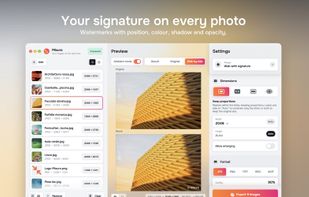
Add a text such as a signature or a copyright notice. Choose position, colour, shadow, opacity, size and margin.
PRESETS AND QUICK EXPORT
Ready-made presets for the web, email, social posts (square and portrait) and 4K screens. Save your own favourite settings as presets too. With "Export on drop", Misuro exports each image as soon as you drop it into the window.
DESTINATION
Choose folder and names when you export: a folder of your choice, even keeping the original subfolders, or a "Misuro" subfolder next to each original. Keep the original names or build your own with number, date and size. Existing files are never overwritten.
MADE FOR MAC
Native on Apple Silicon, and runs on Intel Macs too. Parallel processing with Metal acceleration, light and dark appearance, VoiceOver and keyboard shortcuts.
PRIVATE
No account, no ads, no internet connection. Your images never leave your Mac.
One-time purchase, no subscription.






 EU


 DaniTheDan added Misuro as alternative to Squash - Web Image Compression, ImageOptim, Squoosh, XnConvert and 9 more

 Danilo Marinaccio


No comments or reviews, maybe you want to be first?