Minime App icon
Minime App icon

Minime App

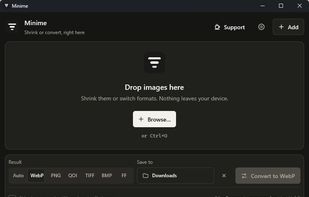
Minime is a free and open-source desktop image compressor and format converter for Windows, macOS, and Linux. Built in Rust, it focuses on lossless image optimization while keeping everything private and local to your device.
Minime App screenshot 1

Cost / License

  • Free
  • Open Source (MIT)

Platforms

  • Mac
  • Windows
  • Linux
  • Flatpak
0likes
0comments
0articles

Features

Properties

  1.  Privacy focused
  2.  Lightweight

Features

  1.  No registration required
  2.  No Tracking
  3.  Works Offline
  4.  Dark Mode
  5.  Hardware Accelerated
  6.  Lossless Compression
  7.  Image Optimizer
  8.  Image Conversion

Minime App News & Activities

Highlights All activities

Recent activities

Minime App information

  • Developed by

    BE flagscorpion7slayer
  • Licensing

    Open Source (MIT) and Free product.
  • Written in

  • Alternatives

    51 alternatives listed
  • Supported Languages

    • English
    • French

AlternativeTo Categories

Photos & GraphicsSystem & Hardware

GitHub repository

  •  0 Stars
  •  0 Forks
  •  0 Open Issues
  •   Updated  
View on GitHub
Minime App was added to AlternativeTo by scorpion7slayer on and this page was last updated .
No comments or reviews, maybe you want to be first?

What is Minime App?

Minime is a free and open-source desktop image compressor and format converter for Windows, macOS, and Linux. Built in Rust, it focuses on lossless image optimization while keeping everything private and local to your device.

Minime can compress images or convert them to formats such as PNG, lossless WebP, QOI, TIFF, BMP, and Farbfeld. Its Auto mode automatically searches for the smallest lossless representation of an image.

Unlike many online image optimization tools, Minime never uploads your images, filenames, metadata, or usage statistics. Every generated image is also verified pixel by pixel before being saved to ensure that the visual content remains exactly identical to the original.

It supports batch processing, drag and drop, image comparison, ICC color profile preservation, automatic output naming, light and dark themes, and English and French interfaces.

