How Docutain helps you:
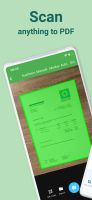
• The integrated document scanner enables fast PDF scans in HD quality. The scan is readable and searchable thanks to automatic OCR text recognition.
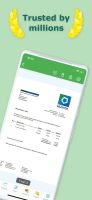
• With the secure document management system and scanner, the right document is at hand in just one click. Paper chaos or going through paper folders are a thing of the past!
• Optional cloud integration and local storage on the device for maximum security of your documents.
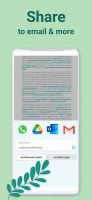
• Share scannable documents directly from the PDF scanner app via email or messenger.
Docutain, the mobile PDF scanner app can also be linked to a PC application. It allows scanning documents + managing them intuitively anytime, on the go with the Docutain app or from home on your Windows PC.
•Benefits of the scanner app
Scan in HD With intelligent document recognition and automatic shutter in the perfect moment, perspective correction, document edge detection, blur-reduction and color correction, you achieve a perfect scan with the PDF scanner app. Create a PDF scan or photo scan, use batch scanning for multiple pages and convert to PDF.
•Edit
Manually crop, color filter, add, reorder, or remove pages. Even after saving, you can still edit the scan of documents.
•Organize and archive your documents
Optional index information when saving a scan (e.g. name, keywords, address, tax relevance, and optical character recognition (OCR)) helps organize and retrieve your digital documents.
Index information is automatically recognized by the scanner app thanks to OCR so that you receive suitable suggestions for indexing scannable PDFs.
Docutain Premium also lets you pay your scanned invoices & monitors expenses through payment providers.
You can use the PDF scanner app to manage not only scannable documents with the camera, but also existing photos and PDF documents. This also enables to convert images to PDF files (jpg to pdf).
•Search & find your scan
Find documents with the help of the detailed search mask, your self-defined criteria or via the full text search thanks to OCR. In addition, quick searches are available, e.g. via keywords or addresses.
•Share
You can export your scannable docs as PDF files & send them directly by mail or text messenger with the mobile scanner.
•Security & Privacy
With optional cloud connection you can protect documents from loss and synchronize them with all your end devices. Available cloud services: GoogleDrive, OneDrive, Dropbox, STRATO HiDrive, MagentaCLOUD, Web.de, GMX MediaCenter, Box, WebDAV, Nextcloud, ownCloud.
For maximum security, you can encrypt all data in the scanner app using state-of-the-art methods and protect app access with a password or fingerprint. No external servers are connected, data is stored locally on your device.
•Use Cases
- Invoices & Contracts
- Tax return
- Rental
- Studies, Homeschooling, Homeoffice
- Recipes





 EU
EU
 Gert Prinsloo added Docutain as alternative to CamScanPDF
 fenrirx22 added Docutain as alternative to Proof Pocket
 Croco Loki added Docutain as alternative to PDFgear Scan, Zoho Scanner and Zency
 zllhff added Docutain as alternative to kept · Document Organizer
 altenativeto added Docutain as alternative to Paperless-ngx


 INFOSOFT Informations- und Dokumentationssysteme GmbH



Comments and Reviews
For me, DOcutain is the best scanner app availabke and I tested many. Feature-rich and good scan quality.
I like Docutain, because it's easy to use and has a lot of handy features, like automatic edge detection, filters and OCR.