Nescanner icon
Nescanner icon

Nescanner

Document scanner for iPhone and iPad that works fully on-device: flat, evenly lit, searchable PDFs with no account, no cloud and no ads.
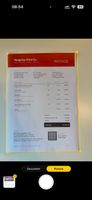
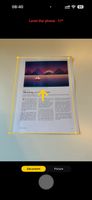
The camera finds the page edges and outlines the page
A hint asks you to level the phone for a sharp scan
Scanned pages, ready to export as one searchable PDF

Cost / License

  • Freemium (Subscription)
  • Proprietary

Platforms

  • iPhone  Requires iOS 26 or later
  • iPad  Requires iPadOS 26 or later
0likes
0articles
Save

Features

Properties

  1.  Privacy focused

Features

  1.  Ad-free
  2.  OCR
  3.  Works Offline
  4.  No registration required
  5.  Scan documents

Nescanner News & Activities

Highlights All activities

Recent activities

Nescanner information

  • Developed by

    CZ flagGlobal Tech Distribution s.r.o.
  • Licensing

    Proprietary and Freemium product.
  • Pricing

    Subscription that costs $2 per month + free version with limited functionality.
  • Alternatives

    11 alternatives listed
  • Badge

    Get an embeddable badge for Nescanner
  • Supported Languages

    • English
    • Ukrainian
    • Czech
    • Polish
    • German
    • Spanish
    • French
    • Italian
    • Portuguese
    • Russian
    • Slovak
    • Dutch
    • Swedish
    • Danish
    • Norwegian Bokmål
    • Finnish
    • Hungarian
    • Romanian
    • Croatian
    • Slovene
    • Turkish
    • Greek
    • Vietnamese
    • Japanese
    • Korean
    • Indonesian
    • Thai
    • Hindi
    • Catalan; Valencian
    • Malay
    • Chinese

AlternativeTo Category

Office & Productivity

Apple AppStore

  •   Updated 
  •   0 avg rating
View in AppStore
Nescanner was added to AlternativeTo by Ruslan-Malymon on and this page was last updated .

No comments or reviews, maybe you want to be first?

Official Links

What is Nescanner?

Nescanner turns the iPhone or iPad camera into a document scanner that does all its work on the device. Point the camera at a page and tap once: the app finds the page edges, straightens the shot into a flat rectangle, removes shadows from your hand or the phone and saves a sharp PDF with searchable text.

Features:

  • Straight pages, even light and white paper from a single tap.
  • Text stays crisp, while photos, colour print and highlights keep their colours.
  • Book pages that curve towards the spine come out flat, with straight lines of text. Letters are never redrawn.
  • Batch mode: hold the phone over a book and turn the pages; each page is captured as soon as it is still, never twice.
  • Searchable PDF: text is recognised on the device and added as an invisible layer.
  • Export all pages as one PDF, or a single page as JPEG or PDF.
  • Import photos from Photos or Files and turn them into clean scans.
  • Siri, Shortcuts, the Action button and a Control Center control open the camera in one step.
  • Captures in RAW (Apple ProRAW where available).

Unlike most scanner apps, Nescanner never turns the page into pure black and white, so thin strokes and grey details survive, and it resamples the photo only once.

Privacy: no account, no sign-in, no servers, no analytics, no ads. Scans never leave the device, and the app works offline.

Pricing: free for up to 30 exported pages a day with every feature at full quality. Nescanner Pro removes the daily limit (US$1.99 a month or US$14.99 a year) and changes nothing else.

Available in 33 languages. Requires iOS 26 or later.