Apps tagged with 'Uvc'

All apps in Apps tagged with 'Uvc' category. Use the filters below to narrow down your search. 
Copy a direct link to this comment to your clipboard
  1. GTK+ UVC Viewer icon
     26 likes

    guvcview is a video viewer and capture software for the linux UVC driver. It is based in luvcview (http://mxhaard.free.fr), but all controls are done with GTK, allowing for a more user friendly GUI.

    Cost / License

    Application type

    Since

    • Since 2010

    Platforms

    • Linux
    GTK+ UVC Viewer screenshot 1
    GTK+ UVC Viewer screenshot 1
    GTK+ UVC Viewer screenshot 2
    22 alternatives
  2. Transforms tablets into portable HDMI monitors for cameras, gaming consoles, and VHS. Offers AI upscaling, CRT emulation, image controls, and optional Pro features.

    Cost / License

    • Freemium
    • Proprietary

    Application type

    Since

    • Since 2023

    Platforms

    • iPad
    • US flagUnited States
    Orion HDMI Monitor screenshot 1
    Orion HDMI Monitor screenshot 1
    Orion HDMI Monitor screenshot 2
    +5
    Orion HDMI Monitor screenshot 3
    17 alternatives
  3. CamX - USB Camera is a multifunctional iOS app that converts your device into a portable video capture tool, capable of recording from various sources, and can also serve as a gaming console display or secondary screen.

    Cost / License

    • Free
    • Proprietary

    Application type

    Since

    • Since 2023

    Platforms

    • iPhone
    • iPad
    • US flagUnited States
    CamX - USB Camera screenshot 1
    CamX - USB Camera screenshot 1
    CamX - USB Camera screenshot 2
    +3
    CamX - USB Camera screenshot 3
    10 alternatives
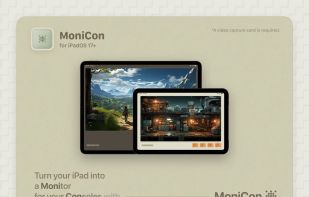
  4. MoniCon icon
     2 likes

    Transforms an iPad into a portable monitor for consoles or HDMI devices, supporting UVC capture cards, AI super resolution, color filters, and immersive fullscreen viewing.

    Cost / License

    • Free
    • Proprietary

    Since

    • Since 2023

    Platforms

    • iPad
    • CN flagChina
    MoniCon screenshot 1
    MoniCon screenshot 1
    MoniCon screenshot 2
    +2
    MoniCon screenshot 3
    13 alternatives
  5. Genki Studio is a software that turns your iPad into a portable monitor and video capture device. It connects to a Genki ShadowCast or any USB UVC device, with features like external monitor support, Apple Pencil markup, and multitasking.

    Cost / License

    • Free
    • Proprietary

    Since

    • Since 2023

    Platforms

    • iPad
    • US flagUnited States
    Genki Studio screenshot 1
    Genki Studio screenshot 1
    Genki Studio screenshot 2
    +3
    Genki Studio screenshot 3
    13 alternatives
  6. FPViewer is an application to display analog video using Easycap & UVC video grabber device connected via OTG cable to android device. (no root required).

    Cost / License

    • Free
    • Proprietary

    Since

    • Since 2020

    Platforms

    • Android
    Main app screenshot
    5.8Ghz receiver example 1
    VR side by side screenshot
    +2
    5.8Ghz receiver example 3
    1 alternative
  7. CamDial icon
     1 like

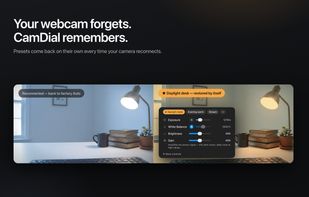
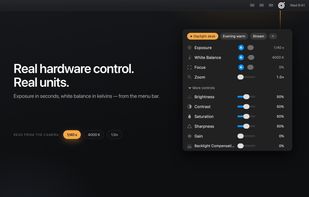
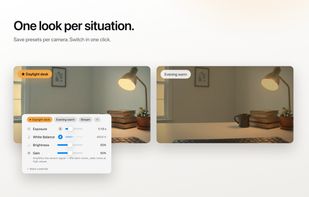
    Menu bar app for USB webcam settings on the Mac. Set exposure, white balance, focus and zoom on the camera itself and save presets that come back by themselves.

    Cost / License

    • Freemium
    • Proprietary

    Since

    • New

    Platforms

    • Mac
    • DE flagGermany
    • European Union flagEU
    CamDial screenshot 1
    CamDial screenshot 1
    CamDial screenshot 2
    2 alternatives
  8. Camerture icon
     Like

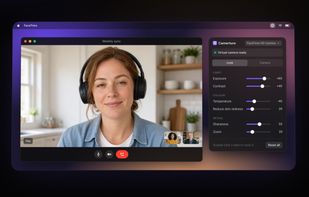
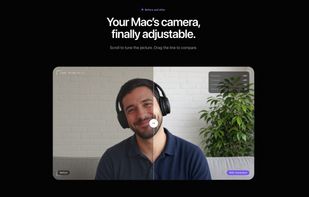
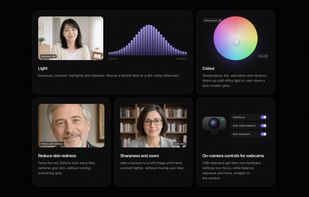
    Menu bar app that adds exposure, colour and skin tone settings to the Mac's built-in camera, Studio Display and iPhone camera, in every video app.

    Cost / License

    • Paid
    • Proprietary

    Since

    • New

    Platforms

    • Mac
    • ES flagSpain
    • European Union flagEU
    The Camerture panel in the menu bar during a FaceTime call: exposure, contrast, temperature, skin redness, sharpness and zoom, with a live preview.
    Before and after: the built-in Mac camera on the left, the same picture with Camerture on the right.
    Adjustments for light, colour, skin redness, sharpness and zoom, plus hardware controls such as autofocus and white balance for USB webcams.
    +2
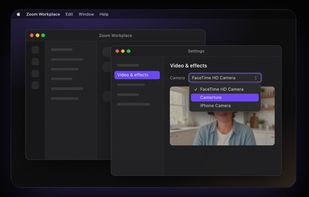
    Choosing Camerture as the camera in Zoom's Video & effects settings. It works the same way in FaceTime, Teams, Meet and other apps.
    7 alternatives