




Side Screen
16 likes
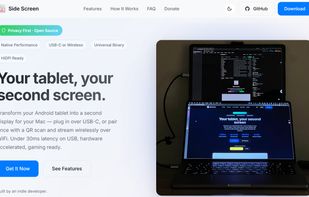
Transforms any Android tablet into a Mac's second monitor using USB-C for low latency or WiFi with QR pairing, featuring H.265 hardware streaming, touch input, HiDPI support, lightweight design, Gaming Mode, open-source customization, and virtual display window management.

Cost / License
- Free
- Open Source (MIT)
Application type
Platforms
- Mac
- Android
- Android Tablet


Features
Highlights All activities
Side Screen News & Activities
Recent activities
 ssssaaaa added Side Screen as alternative to OpenDisplay
- Vyom Mengar liked Side Screen
 Neville-Gee added Side Screen as alternative to DeskJoin Screen
- Nam Pham liked Side Screen
 Stephen-Lovino added Side Screen as alternative to BetterCast Display
 Sharif added Side Screen as alternative to EasySwitch
- casablanca74 liked Side Screen
- Andres liked Side Screen
- Ben liked Side Screen
- leogsp1 liked Side Screen


Developed by
 Tr?n Vuong Qu?c Ð?t
 Licensing
Open Source (MIT) and Free product.Written in
Alternatives
24 alternatives listedBadge
Get an embeddable badge for Side ScreenSupported Languages

AlternativeTo Category
System & HardwareGitHub repository
- 1,103 Stars
- 141 Forks
- 42 Open Issues
- Updated


No comments or reviews, maybe you want to be first?