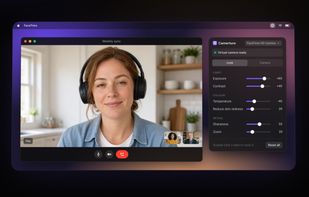
Camerture is a menu bar app that adds image settings to Mac cameras, including the ones that have none: the built-in FaceTime HD camera, the Studio Display camera and iPhone Continuity Camera. It adds a virtual camera called "Camerture" to macOS, which can be chosen in FaceTime, Zoom, Microsoft Teams, Google Meet, Slack, Discord, OBS, browsers and any other app that lets you pick a camera. Unlike apps that only change a USB webcam's own settings, it processes the video itself, so it also works with Apple's cameras.
Settings: exposure, contrast, highlights, shadows, temperature, tint, saturation, vibrance, skin redness reduction, sharpness and zoom, adjusted from the menu bar with a live preview. USB webcams also get their hardware (UVC) controls, such as focus, white balance and exposure. Each camera keeps its own settings.
All processing happens on the Mac; no video is uploaded. Requires macOS 14 Sonoma or later. One-time purchase for up to 2 Macs, with Team and Business licences for groups. Available in English, German, French, Spanish, Italian, Dutch and Japanese.







 EU


 Vuewer



No comments or reviews, maybe you want to be first?