Apps tagged with 'Multi Tasking'

All apps in Apps tagged with 'Multi Tasking' category. Use the filters below to narrow down your search. 
Copy a direct link to this comment to your clipboard
  1. TempleOS icon
     18 likes

    The Temple Operating System (TempleOS) is a free and open source, x86_64, non-preemptive, multi-tasking PC operating system.

    Cost / License

    Application type

    Since

    • Since 2016

    Platforms

    • Self-Hosted
    • US flagUnited States
    TempleOS screenshot 1
    TempleOS screenshot 2
    38 alternatives
  2. Whale icon
     33 likes

    Whale is web browser developed by Naver Corporation. Whale possess a lot of similar features as Vivaldi as being a customized pushed browser, multi-tasking browsing called 'Omnitasking', as much as other features as cloud saves & quick translation.

    Cost / License

    • Free
    • Proprietary

    Application type

    Since

    • Since 2018 (updated Oct 2026)

    Platforms

    • Windows
    • Mac
    • Linux
    • Android
    • iPhone
    • iPad
    • Android Tablet
    • KR flagSouth Korea
    Whale screenshot 1
    Whale screenshot 6
    +13
    Whale screenshot 7
    88 alternatives
    4.0
    Very Good7 ratings
  3. Noted. icon
     11 likes

    Noted is an audio recording and note-taking app for lectures, meetings, interviews, conferences and more, making it easy to record every moment with confidence.

    Cost / License

    • Freemium (Pay once)
    • Proprietary

    Application type

    Since

    • Since 2018 (updated Nov 2026)

    Platforms

    • Mac
    • iPhone
    • iPad
    • Apple Watch
    • GB flagUnited Kingdom
    Noted. screenshot 1
    Noted. screenshot 2
    +2
    Noted. screenshot 3
    182 alternatives
  4. Archiver icon
     9 likes

    ?? Extract Archives: So you downloaded this file you can't open? Don't be fooled by the name — Archiver is a highly versatile unarchiver that can unpack pretty much any archive you throw at it. With Archiver, you can extract RAR, StuffIt, Zip, 7zip and many more popular...

    Cost / License

    • Pay once
    • Proprietary

    Application type

    Since

    • Since 2010

    Platforms

    • Mac
    • NL flagNetherlands
    • European Union flagEU
    Archiver 4 brings you a smooth interface, a blazing fast workflow and a convenient quick preview.,
    Have you ever tried to send an image only to be told that the file is too large? Do your file uploads seem to take forever? Enter Archiver's own compression format, with which you can truly shrink image and audio files.
    With Archiver, you can keep your sensitive data private and secure. Protect your files by packing them in encrypted, password-protected archives.
    +2
    With Archiver, you can take a sneak peek and preview archives. Say goodbye to extracting all files just to see what's inside and archive!
    88 alternatives
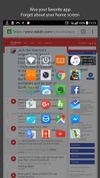
  5. Swiftly Switch is one of the finest and the fastest applications to switch between the apps you want to use. You get all the control of app switching under a single thumb. It is very useful while multitasking with the applications.

    Cost / License

    • Free
    • Proprietary

    Since

    • Since 2016

    Platforms

    • Android
    • VN flagVietnam
    Swiftly switch - App switcher screenshot 1
    Swiftly switch - App switcher screenshot 2
    +10
    Swiftly switch - App switcher screenshot 3
    1 alternative
  6. Silk AI icon
     Like

    Desktop AI agent for Mac and Windows that uses voice or text to control apps, browsers, and files, with live actions and background jobs.

    Cost / License

    • Freemium (Subscription)
    • Proprietary

    Application type

    Since

    • Since 2026

    Platforms

    • Windows
    • Mac
    • PK flagPakistan
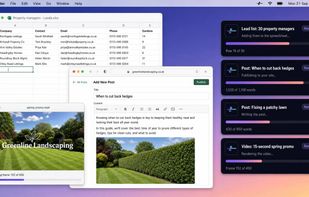
    Silk works through a lead list, two blog posts and a promo video side by side, using the real apps on your computer, while you get on with your day.
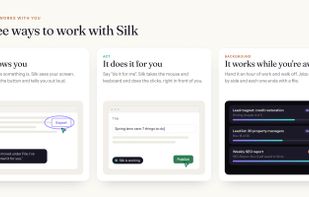
    Guide shows you where things are and talks you through it. Act takes the mouse and keyboard and does the clicks for you. Background runs jobs while you're away and each one ends with a file.
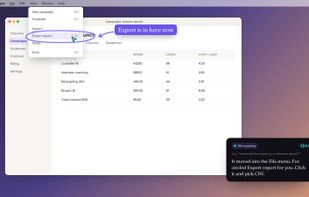
    Ask out loud where something is. Silk sees your screen, circles the right button and tells you what to do next.
    +2
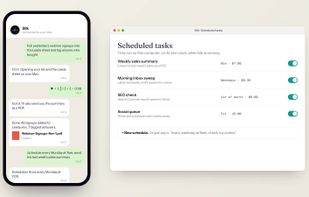
    Message Silk from your phone by text or voice and it does the work on your computer. Set recurring tasks like a weekly sales summary or a monthly SEO check.
    16 alternatives