Apps tagged with 'Windows Utility' Page 2 of 2

All apps in Apps tagged with 'Windows Utility' category. Use the filters below to narrow down your search. 
Copy a direct link to this comment to your clipboard
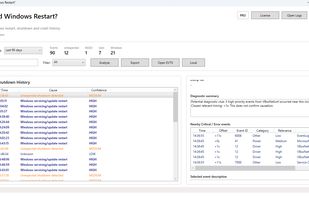
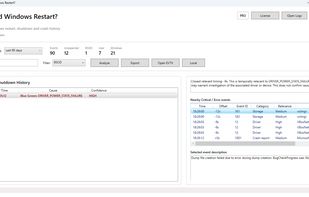
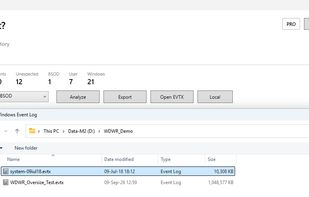
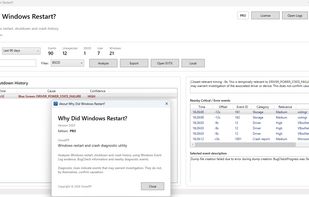
  1. Why Did Windows Restart? is a Windows diagnostic utility that helps investigate unexpected restarts, shutdowns and BSODs using Windows Event Log and BugCheck evidence. It presents restart history, confidence levels and related diagnostic information in a clearer timeline, while...

    Cost / License

    • Freemium (Pay once)
    • Proprietary

    Since

    • New

    Platforms

    • Windows
    • RO flagRomania
    • European Union flagEU
    Why Did Windows Restart? screenshot 1
    Why Did Windows Restart? screenshot 1
    Why Did Windows Restart? screenshot 2
    +1
    Why Did Windows Restart? screenshot 3
    3 alternatives
  2. FreshDisk icon
     Like

    A modern disk space analyzer for Windows that visually maps your storage and uses AI to help you quickly find and clean up unnecessary files.

    Cost / License

    • Freemium (Pay once or Subscription)
    • Proprietary

    Application type

    Since

    • Since 2026

    Platforms

    • Windows
    • US flagUnited States
    Main screen of FreshDisk visualizing disk space usage
    8 alternatives
  3. BoCaps icon
     Like

    BoCaps lets you switch selected text between uppercase and lowercase with a double-tap of Caps Lock, in any Windows app. No menus, no shortcuts to memorize: select your text, double-tap Caps Lock, and it flips case instantly.

    Cost / License

    • Free
    • Proprietary

    Since

    • Since 2026

    Platforms

    • Windows
    Two taps. Case fixed.
    Not just Word. Anywhere you type.
    Quiet in the tray, always ready.
    +1
    Your pace, not the app's.
    1 alternative
  4. Native Windows live wallpaper player built in Rust and Win32 using libmpv. Apply local videos, GIFs, and images with multi-monitor support, FPS cap, and auto-pause built in Rust.

    Cost / License

    Since

    • New

    GitHub

    • GitHub stars: 1

    Platforms

    • Windows
    • ID flagIndonesia
    The project author captured the same wallpaper while its display cache was being prepared and after it finished. The app plays the original media immediately in the foreground while conversion runs in the background.
    2 alternatives
  5. A lightweight Windows utility that helps keep your PC active during long work sessions and provides quick local notes.

    Cost / License

    • Subscription
    • Proprietary

    Since

    • Since 2026

    Platforms

    • Windows
    • JP flagJapan
    Keep your PC awake while reading, testing, or working online — and keep quick local notes nearby.
    Reading documents, waiting for builds or exports, or monitoring long-running tasks? Keep Active helps reduce unwanted interruptions.
    Save simple local memos in a compact list while you work.
    +3
    Search across notes to find saved text and work details when you need them.
  6. CineCinch icon
     Like

    Find and compress space-hogging videos with a simple Windows tool that analyzes folders, ranks inefficient files, and batch-compresses them using H.265 — no complicated presets or command lines.

    Cost / License

    • Pay once
    • Proprietary

    Application type

    Since

    • Since 2026 (updated Jan 2026)

    Platforms

    • Windows
    • US flagUnited States
    CineCinch screenshot 1
    46 alternatives
  7. Professional data recovery software for Windows. Features a powerful freemium model allowing users to recover up to 50 files and 5 GB of data for free.

    Cost / License

    • Freemium (Pay once)
    • Proprietary

    Since

    • Since 2026

    Platforms

    • Windows
    StrongRecovery main interface: Drive selection and file system analysis. Supports NTFS, FAT32, exFAT, and UDF on HDD, SSD, USB drives, and SD cards.
    Scan results overview: StrongRecovery successfully reconstructs folder structures and identifies deleted files. Users can browse recovered data and select specific items for restoration.
  8. TreeXL icon
     Like

    Scans Windows folders, creates multi-sheet Excel reports with file hierarchy and duplicate detection, suggests cleanups, highlights path and permission issues.

    Cost / License

    • Freemium (Pay once)
    • Proprietary

    Application type

    Since

    • Since 2026

    Platforms

    • Windows
    • IT flagItaly
    • European Union flagEU
    Main page
    Excel report
    Audit Folder
    +2
    Duplicate finder
    12 alternatives