
BoCaps icon
BoCaps icon

BoCaps

BoCaps lets you switch selected text between uppercase and lowercase with a double-tap of Caps Lock, in any Windows app. No menus, no shortcuts to memorize: select your text, double-tap Caps Lock, and it flips case instantly.
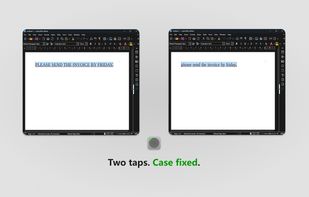
Two taps. Case fixed.

Cost / License

  • Free
  • Proprietary

Platforms

  • Windows
0likes
0comments
0articles

Features

BoCaps News & Activities

Highlights All activities

Recent activities

BoCaps information

  • Developed by

    Unknown
  • Licensing

    Proprietary and Free product.
  • Alternatives

    1 alternatives listed
  • Supported Languages

    • English
    • Portuguese
    • Spanish

AlternativeTo Category

OS & Utilities

Popular alternatives

View all
BoCaps was added to AlternativeTo by Harisson Andrade on and this page was last updated .
No comments or reviews, maybe you want to be first?

What is BoCaps?

BoCaps lets you switch selected text between uppercase and lowercase with a double-tap of Caps Lock, in any Windows app. No menus, no shortcuts to memorize: select your text, double-tap Caps Lock, and it flips case instantly.

Works in Word, email, browsers, code editors, and anywhere else you type. The double-tap doesn't interfere with Caps Lock's normal behavior, and your text selection is preserved after the switch, so you can keep working right away.

BoCaps runs quietly from the system tray, with no extra windows to manage. It starts with Windows automatically, and you can adjust the double-tap speed to match your typing rhythm.

Completely free to use, with an optional way to support the developer if you'd like to.

Official Links