


BlueScreenView
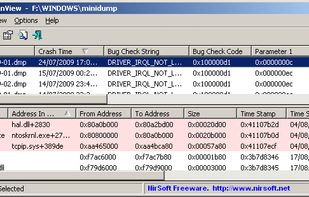
BlueScreenView scans all your minidump files created during 'blue screen of death' crashes, and displays the information about all crashes in one table. For each crash, BlueScreenView displays the minidump filename, the date/time of the crash, the basic crash information...

Cost / License
- Free
- Proprietary
Platforms
- Windows


Features
BlueScreenView News & Activities
Recent News
No news, maybe you know any news worth sharing?
Recent activities
- TBayAreaPat replied to a comment / review on BlueScreenView
- TBayAreaPat replied to a comment / review on BlueScreenView
- TBayAreaPat replied to a comment / review on BlueScreenView
A helpful program that requires you to change two defaults to be useful. 1. Dumpfile type under Windows Startup and Recovery Settings. Windows uses Automatic by default, but to use this program, that needs to be set to minidump. 2. On the program, to see results, check Options/ Advanced Options to see that the first button is checked so that all .dmp files are chosen; (maybe this isn't necessary if you don't do system cleanups of these type files like many people might.) Five stars if it was...
- TBayAreaPat replied to a comment / review on BlueScreenView
- TBayAreaPat commented on BlueScreenView
A helpful program that requires you to change two defaults to be useful. 1. Dumpfile type under Windows Startup and Recovery Settings. Windows uses Automatic by default, but to use this program, that needs to be set to minidump. 2. On the program, to see results, check Options/ Advanced Options to see that the first button is checked so that all .dmp files are chosen; (maybe this isn't necessary if you don't do system cleanups of these type files like many people might.) Five stars if it was...
- b9wzo9tz liked BlueScreenView
Developed by
 NirSoft
 Licensing
Proprietary and Free product.Alternatives
7 alternatives listedBadge
Get an embeddable badge for BlueScreenViewSupported Languages


Comments and Reviews
A helpful program that requires you to change two defaults to be useful. 1. Dumpfile type under Windows Startup and Recovery Settings. Windows uses Automatic by default, but to use this program, that needs to be set to minidump. 2. On the program, to see results, check Options/ Advanced Options to see that the first button is checked so that all .dmp files are chosen; (maybe this isn't necessary if you don't do system cleanups of these type files like many people might.) Five stars if it was Open Source.
I decided to rely more on Perplexity AI as a more comprehensive guide, and uninstalled BlueScreen. Humorously, the day after, Perplexity told me to reinstall it since I was having issues installing Windows debug. For curiousity, I asked for another option, and was referenced to WhoCrashed which automatically
analyzes dumps and writes a plain-English crash report" vs BluescreenView's raw info.
WhoCrashed which automatically
analyzes dumps and writes a plain-English crash report" vs BluescreenView's raw info.