Apps tagged with 'crash-dump-analyzer'

All apps in Apps tagged with 'crash-dump-analyzer' category. Use the filters below to narrow down your search. 
Copy a direct link to this comment to your clipboard
  1. BlueScreenView icon
     45 likes

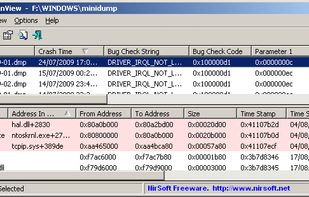
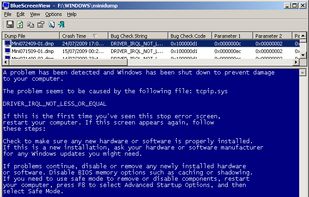
    BlueScreenView scans all your minidump files created during 'blue screen of death' crashes, and displays the information about all crashes in one table. For each crash, BlueScreenView displays the minidump filename, the date/time of the crash, the basic crash information...

    Cost / License

    • Free
    • Proprietary

    Platforms

    • Windows
    BlueScreenView screenshot 1
    BlueScreenView screenshot 1
    7 alternatives
  2. WhoCrashed icon
     19 likes

    WhoCrashed reveals the drivers responsible for crashing your computer. Whenever a computer suddenly reboots without displaying any notice or blue screen of death, the first thing that is often though about is a hardware failure.

    Cost / License

    • Freemium
    • Proprietary

    Platforms

    • Windows
    7 alternatives
  3. WhySoSlow icon
     2 likes

    WhySoSlow does a serious effort at analyzing your system to find out why it's running slow.

    Cost / License

    • Free Personal
    • Proprietary

    Platforms

    • Windows
    WhySoSlow screenshot 1
    4 alternatives
  4. Crashlytics icon
     6 likes

    Light weight crash reporting solution, we find the needle in the haystack, even the exact line of code that your app crashed on.

    Cost / License

    • Paid
    • Proprietary

    Platforms

    • Online
    24 alternatives
  5. It's a tool to analyze .NET process memory: it can dump an application's memory in a file and read it later. It helps you to find memory leaks and deadlocks.

    Cost / License

    Platforms

    • Windows
    MemoScope.Net screenshot 1
    MemoScope.Net screenshot 1
    MemoScope.Net screenshot 2
    +5
    MemoScope.Net screenshot 3
    2 alternatives
  6.  1 like

    Doctor Dump is a free crash reporting and memory dump analyzing service. Its work is to collect software problem reports (crashes, failures, assert violations and so on) from your customers all over the world, to group them and to give you all necessary data to fix the problem.

    Cost / License

    • Free
    • Proprietary

    Application type

    Platforms

    • Windows
    First of all you need to integrate the Doctor Dump crash reporting library into your application. After that when a problem (crash, unhandled exception, invalid parameters, etc.) occurs it will be catched and crash report about the problem will be sent to Doctor Dump crash reporting system. Doctor Dump will analyze the report and using problem footprint (that usually is a stack trace) put it to a group of exact same issues. Similar groups caused by one reason (one buggy function can be called by different callers, so stacks will differ) form a problem that is fixing unit.
    After the crash report has been uploaded user may be directed to a customized web page about that problem where may exist some information, for example a link to a version where the problem has been fixed or some workaround. Or default page may be shown, where user can see the state of the problem and ID of his crash report which he can use when communicate with support.
    In the main dashboard of your application on the Doctor Dump crash reporting system you can see overall crash statistics.
    +3
    Each problem is a collection of similar memory dump groups and a memory dump group is a collection of the crashes with same stack.
    17 alternatives
  7. Scoop catches and saves the stack traces of crashing apps and displays all crashes in a list so you don't have to look through annoyingly long logcats anymore.

    Cost / License

    Platforms

    • Android
    • F-Droid
    Scoop Crashes screenshot 1
    Scoop Crashes screenshot 1
    Scoop Crashes screenshot 2
    +6
    Scoop Crashes screenshot 3
    18 alternatives