
Xnip icon
Xnip icon

Xnip

Screenshot app for macOS includes scrolling capture for full-page screenshots, multi-window selection, annotation tools, color picker, shadow effects, object measurement, pixel accuracy, and pinning images—ideal for code, chats, articles, and design references.
Xnip screenshot 1

Cost / License

  • Freemium (Subscription)
  • Proprietary

Application type

Platforms

  • Mac
1like
0articles
Save

Features

  1.  Annotate Screenshot
  2.  Edit screenshots
  3.  Image Annotations

Xnip News & Activities

Highlights All activities

Recent activities

  • Gisti icon
    Viktor Savchenkov added Xnip as alternative to Gisti
  • FletchShot icon
    devacxx01 added Xnip as alternative to FletchShot
  • Curate Draw icon
    Danilo Venom added Xnip as alternative to Curate Draw
  • SnapKeep icon
    Mohammad Hadizadeh added Xnip as alternative to SnapKeep
  • macshot icon
    Paul added Xnip as alternative to macshot
  • SimplShot icon
    Fla added Xnip as alternative to SimplShot
  • Fla updated Xnip
  • Freeshot icon
    freeshot added Xnip as alternative to Freeshot
  • Scap icon
    Paul added Xnip as alternative to Scap
  • EasyCapture Pro icon
    Paul added Xnip as alternative to EasyCapture Pro

Xnip information

  • Developed by

    CN flagZida Zhang
  • Licensing

    Proprietary and Freemium product.
  • Pricing

    Subscription that costs $5 per month + free version with limited functionality.
  • Alternatives

    29 alternatives listed
  • Badge

    Get an embeddable badge for Xnip
  • Supported Languages

    • English

AlternativeTo Category

Photos & Graphics
Xnip was added to AlternativeTo by Paul on and this page was last updated .

No comments or reviews, maybe you want to be first?

Official Links

What is Xnip?

Handy screenshot App for macOS. Xnip has rich image annotation tools. Easy to use.

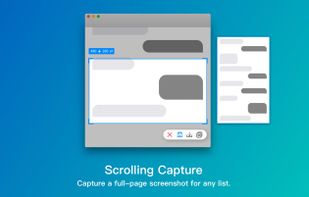
Scrolling capture helps you to capture a full-page screenshot even if the content not showing on the current screen. You can use scrolling capture to capture your source code, article, chat history, etc.

Window capturing with the shadow effect. Furthermore, you can select multiple windows and capture all of them together. With the color picker tool, you can pick the color of any pixel on the screen and make pixel-perfect capture.

Measure objects by the screen with the physical unit size indicator of selection. Pin screenshot or any image on your screen.

Xnip Videos