🛡? Why SnapKeep?
Most screenshot tools today prioritize instant cloud sharing over user privacy. SnapKeep flips the script. It is built for professionals handling sensitive data, researchers who need organized libraries, and anyone who wants a "Set it and Forget it" workflow that feels like a native part of macOS.
🚀 Key Features
On-Device Intelligence (macOS 26+): Uses Apple’s local FoundationModels to summarize screenshots and suggest smart filenames/folders. Zero data leaves your device.
Per-File Encryption: Lock sensitive captures with AES-256-GCM encryption. Even if your Mac is accessed, your encrypted shots remain unreadable.
Built-in OCR: Powered by Apple’s Vision framework. Instantly extract text from any capture without needing an internet connection.
Privacy Guard: One-click metadata stripping (EXIF, GPS, etc.) to ensure your identity and location are protected before you share.
iCloud-Safe Sync: Sync is optional. If enabled, it uses your own private iCloud container—no third-party servers involved.
Native Annotation Suite: A fast, SwiftUI-based editor for arrows, text, highlighting, and redaction.
📂 Pro Organization
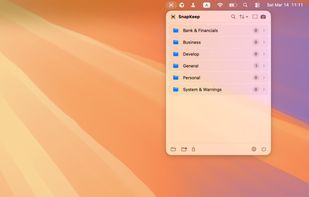
Menu Bar Access: Lives in your tray for zero-clutter productivity.
Library Management: Search, filter, and organize shots into custom folders.
Desktop Widget: Keep a rotation of your non-encrypted screenshots visible on your desktop for inspiration or reminders.
🌍 Fully Localized
Available in English, Deutsch, Français, Italiano, and Español.







No comments or reviews, maybe you want to be first?