FletchShot is a screenshot annotation tool for macOS, built for people who liked the Skitch feel — the tapered pink arrow, the instant capture-to-canvas window, the drag-away tab at the bottom edge that drops a real image file straight into Slack, Finder, Mail or your terminal. The default hotkey is Option-Command-4, the one your hands already know. The canvas opens with the arrow tool already selected: no save dialog, no "choose a mode" in between.
The arrow is born thin where you start dragging and swells toward the point it's making — one filled shape, not a line wearing a hat. Nine preset colors plus a picker, with your last eight one click away. Every annotation stays an object you can reselect, move or delete, with practically unlimited undo. Shapes, highlighter, numbered stamps (1/A/a/i), text in four fonts, pixelate.
Recording gets the same treatment. Capture the full screen, an area, or a window, then flip one footer switch between MP4 and GIF. Draw on the recording with the same tools you use on stills — each annotation carries its own start and end time, and everything bakes into the exported file. Trim cuts the middle, not just the ends: pick the stretch you fumbled and cut it out, without re-recording. Pixelate covers names, addresses or notifications caught in the frame before the file ever leaves your Mac.
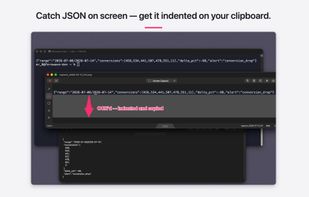
Around that: scrolling capture for long pages, on-device OCR (Apple Vision) that also re-indents JSON on the clipboard, a local history of your last 50 captures, pinned always-on-top captures, re-shoot the exact same region with one hotkey, self-timer, filename templates, and Shortcuts integration. Each feature gets a handful of settings — good defaults, three seconds to use, no forest of dials.
Nothing leaves your Mac: zero network calls, no account, no cloud, no analytics. Free to download with a full 14-day trial; after that, capturing and drawing stay free forever, and a one-time $9.99 unlocks saving, copying and sharing. No subscription, ever. Universal binary, macOS 14 or later, distributed through the Mac App Store.







 devacxx01 added FletchShot as alternative to Shottr, iSkitch, CleanShot X, Monosnap and 1 more
 GONOSEN, K.K.


Comments and Reviews
Developer here. FletchShot started as a selfish project: Rosetta 2 goes away in 2027 and I didn't want to relearn how to point at things. So the brief was narrow — capture, arrow, drag it into the chat, three seconds, no dialogs on the way. Recording, GIF export and on-device OCR ended up on board, but each one gets a handful of settings and that's it. Nothing touches the network; there's nothing to sign up for. Trial is 14 days with everything on, then a one-time $9.99 for saving, copying and sharing. Happy to answer anything here.