

Sukushot icon
Sukushot icon

Sukushot

 Like

Sukushot is a menu-bar app that makes screenshots and screen recording effortless — just press your own keyboard shortcut. Add arrows, text, shapes and lines to what you capture, then copy or save it right away.
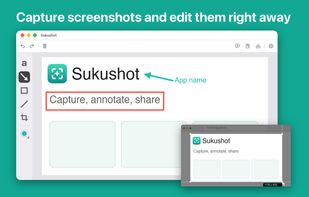
Capture and annotate screenshots.

Cost / License

  • Freemium (Pay once or Subscription)
  • Proprietary

Application type

Since

  • New

Platforms

  • Mac  Requires macOS 15.0 or later. Supports Apple silicon and Intel-based Macs.
0likes
0articles
Save

Features

Properties

Features

Highlights All activities

Sukushot News & Activities

Recent activities

Sukushot information

  • Developed by

    Kairi Miura
  • Licensing

    Proprietary and Freemium product.
  • Pricing

    One time purchase that costs $20, and / or subscription that costs $2 per month + free version with limited functionality.
  • Alternatives

    19 alternatives listed
  • Badge

    Get an embeddable badge for Sukushot
  • Supported Languages

    • English
    • Arabic
    • Catalan; Valencian
    • Chinese
    • Croatian
    • Czech
    • Danish
    • Dutch
    • Finnish
    • French
    • German
    • Greek
    • Hebrew
    • Hindi
    • Hungarian
    • Indonesian
    • Italian
    • Japanese
    • Korean
    • Malay
    • Norwegian Bokmål
    • Polish
    • Portuguese
    • Romanian
    • Russian
    • Slovak
    • Spanish
    • Swedish
    • Thai
    • Turkish
    • Ukrainian
    • Vietnamese

AlternativeTo Category

Photos & Graphics
Sukushot was added to AlternativeTo by Sukushot on and this page was last updated .

No comments or reviews, maybe you want to be first?

Official Links

What is Sukushot?

Sukushot is a menu-bar app that makes screenshots and screen recording effortless — just press your own keyboard shortcut. Add arrows, text, shapes and lines to what you capture, then copy or save it right away.

CAPTURE • Assign your own keyboard shortcuts and capture or record in one keystroke, from any app • Capture a selected area, or use the timer • Screen recording, with app audio • iPhone / iPad screen mirroring, recording and screenshots • Translate the text in your screenshots, or extract it with OCR

ANNOTATE AND EDIT • Arrows, text, rectangles, ellipses and lines (dashed and double-arrow) • Quick adjustments for shapes and text, plus image editing tools • Drag the image from the status bar into Finder or Messages • Custom colors • Save as JPEG, HEIC, TIFF or PDF

Some features are available through in-app purchase.

Privacy Policy: https://sukushot-app.github.io/privacy.html Terms of Use: https://www.apple.com/legal/internet-services/itunes/dev/stdeula/

Sukushot Videos

