
WorkloadWall icon
WorkloadWall icon

WorkloadWall

A self-hosted ticketing system where every open ticket is a post-it note on a wall the people raising requests can see before they add to it.
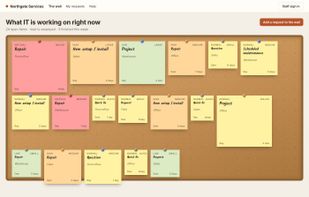
The public wall: every open request as an anonymized note, shown above the request form so people see the pile before adding to it.

Cost / License

  • Pay once or Subscription
  • Proprietary

Application type

Platforms

  • Windows
  • Linux
  • Android
  • Self-Hosted
  • Raspberry Pi
  • Docker
0likes
0articles
Save

Features

Properties

  1.  Lightweight

Features

  1.  Recurring Tasks
  2.  Calendar Integration
  3.  Ad-free
  4.  Team Collaboration
  5.  Helpdesk Ticketing

WorkloadWall News & Activities

Highlights All activities

Recent activities

WorkloadWall information

  • Developed by

    US flagDAGAZ LLC
  • Licensing

    Proprietary and Commercial product.
  • Pricing

    One time purchase ranging between $149 and $799, and / or subscription ranging between $129 and $199 per year.
  • Alternatives

    14 alternatives listed
  • Badge

    Get an embeddable badge for WorkloadWall
  • Supported Languages

    • English
WorkloadWall was added to AlternativeTo by Dagazllc on and this page was last updated .

No comments or reviews, maybe you want to be first?

What is WorkloadWall?

WorkloadWall is a ticketing system for the department a building sends its work to: IT, facilities and maintenance, operations, office admin. It installs on a Windows PC, a Linux box or Raspberry Pi, in Docker, or from a bootable image onto a machine with no operating system, and the ticket database is one folder on that machine.

Its distinguishing idea is the wall. Instead of a portal that shows a requester only their own ticket, the whole open queue is displayed as anonymized notes above the request form, so people can see what is already in the pile before adding to it. Requesters need no account, are not counted against the license, and cannot be charged for.

It is bought once per major version rather than per agent per month. Updates within that version are included and install themselves on Windows, Linux and the Raspberry Pi; a Docker container is updated by pulling the new image. There is no web server, database or language runtime to install separately, and nothing is downloaded during setup.

An optional Jobs add-on covers work that happens at a customer address: customers and properties, scheduling, quotes accepted by link, invoices and a day sheet. An Android companion app pairs to your own server by QR code. A hosted Cloud Edition is a separate arrangement.

Optional features that send data outside the machine are each off until switched on: email intake, outgoing mail, AI triage, backup copies to a destination you choose, calendar sync and outside access.

The source is not published. A 30-day trial has every feature on and needs no card and no account.
