Open Source File Explorer Alternatives for Windows

There are many alternatives to File Explorer for Windows if you are looking for a replacement. The best open source Windows alternative is Double Commander. If that doesn't suit you, our users have ranked more than 100 alternatives to File Explorer and many of them are open source and available for Windows so hopefully you can find a suitable replacement. Other interesting open source Windows alternatives to File Explorer are Files, Spacedrive, Dolphin File Manager and Explorer++.

filter to find the best alternatives

File Explorer alternatives are mainly File Managers, but if you're looking for File Search Utilities or File Archivers you can filter on that. Other popular filters include Open Source, Windows, Windows + Open Source, Linux, Free, Windows + Free and Mac. You can also filter by region, for example EU-based alternatives if you prefer software developed in the European Union. These are just examples - use the filter bar below to find more specific alternatives to File Explorer.
Copy a direct link to this comment to your clipboard
File Explorer alternatives page was last updated

Alternatives list

  1. Double Commander icon
     602 likes

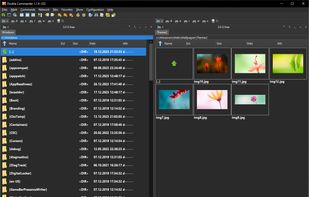
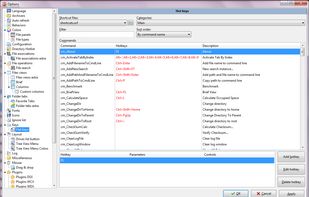
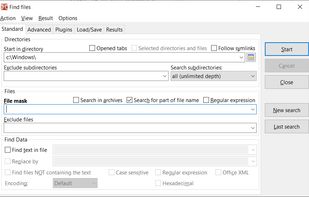
    Open-source file manager with dual-panel interface, inspired by Total Commander. Supports plugin use, advanced search, tabbed browsing, and runs smoothly with background operations. Unicode and multi-platform compatibility enhance its versatility.

    131 Double Commander alternatives

    Cost / License

    Application type

    Platforms

    • Mac
    • Windows
    • Linux
    • BSD
     
    |
    3
    Double Commander vs File Explorer Comments
    Guest
    Negative
    0

    It tries too hard to be just a Total Commander replacement. Ultimately it feels like a console interface file manager rather than a GUI file manager with a lot of simple mechanisms in modern GUI-based file managers (not just Windows Explorer!) incredibly hard to replicate.

    Review by a new / low-activity user.
    Guest
    Negative
    -13

    not contain columns for video settings (video length)

    Review by a new / low-activity user.
    RemovedUser
    Negative
    -84

    Why 2 windows in one? I just want a directory tree with a pane showing the contents of that directory.

    Review by a new / low-activity user.
    • Double Commander is Free and Open SourceFile Explorer is Free and Proprietary
    • Double Commander is Privacy focusedFile Explorer is not according to our users
  2. Files icon
     167 likes

    Advanced Windows file manager offers tabbed browsing, dual-pane drag-and-drop, column navigation, built-in archive creation and extraction, file tagging, QuickLook previews, context menu integration, quick search, and customizable appearance for streamlined organization.

    119 Files alternatives

    Cost / License

    • Free
    • Open Source (MIT)

    Application types

    Platforms

    • Windows
     
    |
    5
    Files vs File Explorer Comments
    Top Positive Comment
    cardinal4
    4

    One of the slowest file managers, taking seconds to navigate between directories.

    On the plus side, its UI is the closest to Windows Explorer, making it easy to get used to Context Menu navigation, Dropbox on-demand sync, navigational side bar etc.

    Qwak66
    Negative
    -6

    It is not free. You have to pay to use it. First "open source" program I found that is not free.

    Review by a new / low-activity user.
    drtech
    Positive
    0

    I like the clean look and feel of the application. In addition, there is a lot of work being done on it (open source community) which is improving performance and adding features regularly.

    3 of 5 comments
    • Files is Free and Open SourceFile Explorer is Free and Proprietary
    • Files is Privacy focused and CustomizableFile Explorer is not according to our users
  3. Spacedrive icon
     153 likes

    Open-source file explorer integrates cloud, local, and offline storage across devices using a secure virtual distributed filesystem in Rust, enabling unified management, file syncing, privacy control, intuitive interface, and ownership without centralized servers.

    78 Spacedrive alternatives

    Cost / License

    Application type

    Platforms

    • Mac
    • Windows
    • Linux
     
    |
    1
    Spacedrive vs File Explorer Comments
    Guest
    Negative
    0

    Because it lacks a lot of features. For exemple, it doesn't handle network shares.

    Review by a new / low-activity user.
    • Spacedrive is Free and Open SourceFile Explorer is Free and Proprietary
    • Spacedrive is Privacy focusedFile Explorer is not according to our users
  4. Usability-focused file manager for KDE desktops offering tabbed and dual-pane browsing, archive support, quick file renaming, filter-based searching, customizable icons, theme adaptation, preview modes, and extensibility with various service integrations.

    80 Dolphin File Manager alternatives

    Cost / License

    Application types

    Platforms

    • Windows
    • Linux
    • KDE Plasma
    • Flathub
     
    |
    3
    Dolphin File Manager vs File Explorer Comments
    tibi97427
    Negative
    1

    Dolphin is for linux, not for Windows.

    aronkvh
    Positive
    0

    It's amazing on Linux and pretty good on Windows. It's pretty, fast, customizable and has a lot of features.

    stevem109
    Positive
    1

    Dolphin is one of my favorite file managers. The negative comment above is incorrect. "Dolphin is for Linux.............", there is also a Windows version, just not as full featured.

    Review by a new / low-activity user.
    • Dolphin File Manager is Free and Open SourceFile Explorer is Free and Proprietary
    • Dolphin File Manager is Privacy focusedFile Explorer is not according to our users
  5. Explorer++ icon
     114 likes

    Explorer++ is a free file manager for Windows. Available on Windows XP and above, it features the same familiar interface as Windows Explorer, while introducing several enhancements and improvements for a much richer file browsing experience.

    91 Explorer++ alternatives

    Cost / License

    Application type

    Platforms

    • Windows
    • PortableApps.com
     
    |
    2
    Explorer++ vs File Explorer Comments
    Guest
    Positive
    1

    Explorer++ has better features than Windows built-in file manager. Xplorer2 and XYplorer are both better than Explorer++.

    Review by a new / low-activity user.
    Guest
    Positive
    0

    I enjoy this Explorer. I would say it's the best Explorer who exist.

    Review by a new / low-activity user.
    • Explorer++ is Free and Open SourceFile Explorer is Free and Proprietary
  6. Sigma File Manager is a free, open-source, quickly evolving, modern file manager (explorer / finder) app for Windows and Linux.

    69 Sigma File Manager alternatives

    Cost / License

    • Free
    • Open Source

    Application types

    Platforms

    • Windows
    • Linux
     
    |
    1
    Sigma File Manager vs File Explorer Comments
    Guest
    Positive
    0

    Amazing alternative to explorer.exe sleek and full featured. Certainly worth trying out!

    Review by a new / low-activity user.
    • Sigma File Manager is Free and Open SourceFile Explorer is Free and Proprietary
    • Sigma File Manager is Privacy focusedFile Explorer is not according to our users
  7. Tablacus Explorer is a tabbed file manager with Add-on support.

    Tabbed interface Add-on support Customizable association, menus, keys, mouse gestures, alias Completely Portable, No installation required Multiple language and Unicode support Open source .

    46 Tablacus Explorer alternatives

    Cost / License

    • Free
    • Open Source (MIT)

    Application type

    Platforms

    • Windows
     
    |
    2
    Tablacus Explorer vs File Explorer Comments
    Guest
    Positive
    2

    Very customizable and responsive. It has preloaded layouts such as dual pane, four pane, one pane layouts and layouts with tab titles at different places. You can create customized bars, etc. Although not as good as Linux alternatives, it's quite above the average for Windows file managers. However, customization is a bit complicated, it's something for power users.

    Review by a new / low-activity user.
    Guest
    Positive
    0

    It has multiple panes to be viewed at the same time. These can be extend to the number desired, by extensions.

    Review by a new / low-activity user.
    • Tablacus Explorer is Free and Open SourceFile Explorer is Free and Proprietary
    • Tablacus Explorer is Privacy focusedFile Explorer is not according to our users
  8. Far Manager icon
     179 likes

    Far Manager is a program for managing files and archives in Windows operating systems. Far Manager works in text mode and provides a simple and intuitive interface for performing most of the necessary actions:

    107 Far Manager alternatives

    Cost / License

    • Free
    • Open Source

    Application type

    Platforms

    • Windows
     
  9. muCommander icon
     125 likes

    muCommander is a lightweight, cross-platform file manager with a dual-pane interface. It runs on any operating system with Java support (Mac OS X, Windows, Linux, *BSD, Solaris...).

    109 muCommander alternatives

    Cost / License

    • Free
    • Open Source

    Application type

    Platforms

    • Mac
    • Windows
    • Linux
    • Online
    • BSD
    • Java
     
    |
    1
    muCommander vs File Explorer Comments
    RemovedUser
    Negative
    -8

    Forced to have 2 panes open, neither one is wide enough. Open the "tree view" and you've lost a lot of screen real estate. Neither pane follows the tree view either, so there's no point having it.

    Review by a new / low-activity user.
    • muCommander is Free and Open SourceFile Explorer is Free and Proprietary
  10. trolCommander icon
     54 likes

    trolCommander - fork of the free and opensource muCommander filemanager.

    Cost / License

    • Free
    • Open Source

    Application type

    Alerts

    • Discontinued

    Platforms

    • Mac
    • Windows
    • Linux
     
  11. FileExplorer icon
     5 likes

    File Explorer is a Windows file manager application that has an interface similar to Windows Explorer. However, it browses and indexes folders faster than the default Explorer. It also has many features that are not available in Windows Explorer, such as tabs and bulk file...

    5 FileExplorer alternatives

    Cost / License

    • Free
    • Open Source (MIT)

    Application type

    Platforms

    • Windows
     
12 of 30 File Explorer alternatives