File Explorer AlternativesOnly apps categorised as File Archivers

The best File Archiver alternative to File Explorer is Files, which is both free and Open Source. If that doesn't suit you, our users have ranked more than 100 alternatives to File Explorer and eight of them are File Archivers so hopefully you can find a suitable replacement. Other interesting File Archiver alternatives to File Explorer are Dolphin File Manager, Sigma File Manager, Commander One and NexusFile.

filter to find the best alternatives

File Explorer alternatives are mainly File Archivers, but if you're looking for File Managers or File Search Utilities you can filter on that. Other popular filters include Open Source, Windows, Windows + Open Source, Linux, Free, Windows + Free and Mac. You can also filter by region, for example EU-based alternatives if you prefer software developed in the European Union. These are just examples - use the filter bar below to find more specific alternatives to File Explorer.
Copy a direct link to this comment to your clipboard
File Explorer alternatives page was last updated

Alternatives list

  1. Files icon
     167 likes

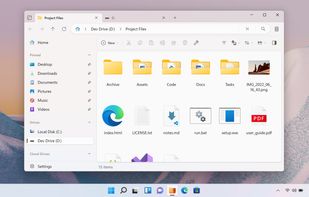
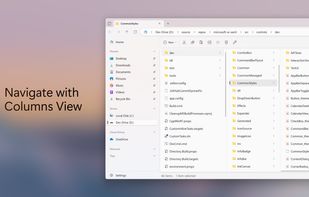
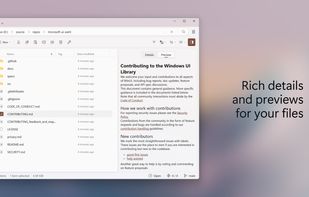
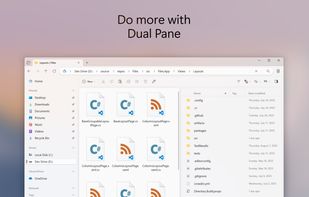
    Advanced Windows file manager offers tabbed browsing, dual-pane drag-and-drop, column navigation, built-in archive creation and extraction, file tagging, QuickLook previews, context menu integration, quick search, and customizable appearance for streamlined organization.

    119 Files alternatives

    Cost / License

    • Free
    • Open Source (MIT)

    Application types

    Platforms

    • Windows
     
    |
    5
    Files vs File Explorer Comments
    Top Positive Comment
    cardinal4
    4

    One of the slowest file managers, taking seconds to navigate between directories.

    On the plus side, its UI is the closest to Windows Explorer, making it easy to get used to Context Menu navigation, Dropbox on-demand sync, navigational side bar etc.

    Qwak66
    Negative
    -6

    It is not free. You have to pay to use it. First "open source" program I found that is not free.

    Review by a new / low-activity user.
    drtech
    Positive
    0

    I like the clean look and feel of the application. In addition, there is a lot of work being done on it (open source community) which is improving performance and adding features regularly.

    3 of 5 comments
    • Files is Free and Open SourceFile Explorer is Free and Proprietary
    • Files is Privacy focused and CustomizableFile Explorer is not according to our users
  2. Usability-focused file manager for KDE desktops offering tabbed and dual-pane browsing, archive support, quick file renaming, filter-based searching, customizable icons, theme adaptation, preview modes, and extensibility with various service integrations.

    80 Dolphin File Manager alternatives

    Cost / License

    Application types

    Platforms

    • Windows
    • Linux
    • KDE Plasma
    • Flathub
     
    |
    3
    Dolphin File Manager vs File Explorer Comments
    tibi97427
    Negative
    1

    Dolphin is for linux, not for Windows.

    aronkvh
    Positive
    0

    It's amazing on Linux and pretty good on Windows. It's pretty, fast, customizable and has a lot of features.

    stevem109
    Positive
    1

    Dolphin is one of my favorite file managers. The negative comment above is incorrect. "Dolphin is for Linux.............", there is also a Windows version, just not as full featured.

    Review by a new / low-activity user.
    • Dolphin File Manager is Free and Open SourceFile Explorer is Free and Proprietary
    • Dolphin File Manager is Privacy focusedFile Explorer is not according to our users
  3. Sigma File Manager is a free, open-source, quickly evolving, modern file manager (explorer / finder) app for Windows and Linux.

    69 Sigma File Manager alternatives

    Cost / License

    • Free
    • Open Source

    Application types

    Platforms

    • Windows
    • Linux
     
    |
    1
    Sigma File Manager vs File Explorer Comments
    Guest
    Positive
    0

    Amazing alternative to explorer.exe sleek and full featured. Certainly worth trying out!

    Review by a new / low-activity user.
    • Sigma File Manager is Free and Open SourceFile Explorer is Free and Proprietary
    • Sigma File Manager is Privacy focusedFile Explorer is not according to our users
  4. Commander One icon
     73 likes

    Commander One is dual-pane file manager for OS X created in Swift, which enables you to manage your files in the best possible way.

    94 Commander One alternatives

    Cost / License

    • Freemium
    • Proprietary

    Application types

    Platforms

    • Mac
     
    |
    1
    Commander One vs File Explorer Comments
    RemovedUser
    Negative
    -5

    Is there a choice for single-pane? Or would that be Commander Two?

    Review by a new / low-activity user.
    • Commander One is Freemium and ProprietaryFile Explorer is Free and Proprietary
  5. NexusFile icon
     39 likes

    NexusFile is a file manager for Windows. You can manage many files very fast and easily. NexusFile will increase your computing performance. If you still use Windows Explorer, you must try this one.

    Cost / License

    • Free
    • Proprietary

    Application type

    Platforms

    • Windows
     
    |
    1
    NexusFile vs File Explorer Comments
    Guest
    Positive
    0

    Look and feel like old Norton Commander on steroids.

    Review by a new / low-activity user.
    • NexusFile is Free and ProprietaryFile Explorer is also Free and Proprietary
  6. My Commander icon
     28 likes

    My Commander (MyCO) is "the smallest - smartest - fastest file manager in the world", for Windows. Small and smart, MyCO uses less of your computer's memory while it's running.

    Cost / License

    • Free
    • Proprietary

    Application type

    Platforms

    • Windows
     
  7. PowerDesk Professional is the easiest file management software for organizing & managing your files, digital photos, & MP3 files. File manager Windows.

    Cost / License

    • Paid
    • Proprietary

    Application type

    Platforms

    • Windows
     
  8. V is an all-purpose File Manager for Windows.

    V is not just another Windows Explorer replacement. Its main strength is its inbuilt file viewer which excels at viewing files quickly - whether they are 100 bytes or 100 gigabytes in size.

    A Dual Pane interface (optional) makes it.

    59 V - The File Viewer alternatives

    Cost / License

    • Paid
    • Proprietary

    Application type

    Platforms

    • Windows
     
8 of 8 File Explorer alternatives