


Wox Launcher
208 likes
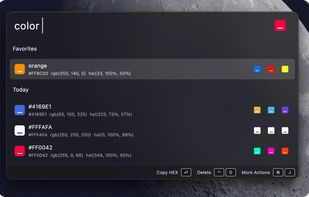
Wox is an open-source launcher for macOS, Linux, and Windows. It keeps local search, keyboard-first actions, and an extensible plugin system in one focused input.

Cost / License
- Free
- Open Source (GPL-3.0)
Application typeApplication types
Platforms
- Mac
- Windows
- Linux
- Homebrew


Features
Wox Launcher News & Activities
Highlights All activities
Recent News
No news, maybe you know any news worth sharing?
Share a News Tip
Recent activities
 GrabThat-Developer added Wox Launcher as alternative to GrabThat
 SuperCommands added Wox Launcher as alternative to SuperCommands
 Paul added Wox Launcher as alternative to Look
 IAmInControl added Wox Launcher as alternative to Alcove Workspace
 Primz added Wox Launcher as alternative to TypeJump
 ProtagonistLabs added Wox Launcher as alternative to Lume Launcher
 Stavros added Wox Launcher as alternative to Swyvo
- qianlifeng updated Wox Launcher
- Croco Loki liked Wox Launcher
- Haytham6y6 liked Wox Launcher


Featured in Lists



My Windows Setup
These are all the software I use on my windows machine. I am privacy freak. So, I mostly use open source software. Checkout "My Firefox setup" list for firefox extensions.


A Software Engineer Work Essentials
An up to date list of what I need in order to do my job.


Core, Development & Services
A list with 807 apps by AmileyaRyver without a description.
What is Wox Launcher?
Wox Launcher Videos
Wox Launcher information
Developed by
 qianlifeng
 Licensing
Open Source (GPL-3.0) and Free product.Written in
Rating
Average rating of 3.4Alternatives
86 alternatives listedBadge
Get an embeddable badge for Wox LauncherSupported Languages

AlternativeTo Categories
File Management, Office & Productivity, OS & Utilities, Online ServicesGitHub repository
- 27,466 Stars
- 2,435 Forks
- 5 Open Issues
- Updated


Comments and Reviews
Sure, it finds everything super fast and is very extensible, but keep in mind that the Wox app consumes 70-80 MB of memory and requires the Everything app to also be running, which consumes another 70-80 MB. If you are limited on resources, then there are other command-line launchers out there that consume a lot less memory.
I'm surprised, but apparently you are right about it relying on the Everything app
I downloaded like ten launchers and tested 'em all out, and I ended up surprised by Wox's popularity on alternativeto.net. The app would repeatedly crash and throw errors when trying to use any plugin. Gave it a miss in favour of more stable apps.
Which ones? "The more Stable Apps"? I have been using Launchy and looking at Wox now. What options you using?
to deepbind.. when the chips are down, there's also the old Win F3 hotkey method... I don't like it any better than you, but..
Sorry for the poor experience. Wox went through a period of no maintenance, but now it has been actively updated for three years (since 2023) and has released a cross‑platform V2 version. Welcome those who are still interested in trying it.
Overall, it's a good search feature that works well, fast, and makes it easy to find what you're looking for. The interface is clean, and the search functionality itself feels responsive and reliable. However, there is one aspect that I found a bit confusing. If you want to exit or unfocus the search bar, you have to press the Esc key. Clicking anywhere outside of the search bar doesn't close or unfocus it, which is the behavior that most applications with a search field typically follow. Because of that, I initially assumed clicking elsewhere would work, and it took me a moment to realize I needed to use the keyboard instead. It's a small usability issue rather than a major problem, but supporting the standard behavior of clicking outside the search bar to exit it would make the experience feel more intuitive and consistent with what users expect from similar programs.
Actually, this can be completely specified in the settings. Just Turn on setting - Hide on lost focus
I'm not sure that there's any benefit to using this over using the Win F3 hotkey.. at least with Win F3, you don't have to type out things like doc, to look up documents, or wonder if you got other abbreviations right, because there's tabs with Windows that spell things out. I'm thinking it might have value as a cross-browser bookmark finder (with a plug-in), but I'd sooner go with StorUrl.
Wox is almost abandon ware. It works pretty well, but there are a few irritating bugs that have gone un-addressed for a long time. There are no recent releases and very little activity on the github project.
Sadly no longer activly maintain.
Update June 2025
Does someone know if it's possible to have Wox show search results based on recency? I.e. most frequently/recently chosen results shows up first. I'd like Wox to LEARN from the choices I pick from its results list (like how Launchbar for macOS does it). Right now, it's pretty unintelligent in that regard.
I'd also like to be able to use abbreviations for common items (again, like Launchbar on Mac). I presume this isn't possible in Wox, correct?
[Edited by hced, October 30]
It's a suitable Alfred replacement that works around Windows' terrible search functionality.
Great Comment! — Yes! – Windows’ Native Search is Astoundingly BAD {to phrase it Mildly} to be released by an OS-Creator! IF M$ had ANY sense, they should be SOOO embarrassed that a KEY aspect of their OS is GARBAGE!! The ONE reason that I allow Windows to Continue to Index my files is because I like OneNote ... & OneNote is Dependent on Windows’ Search-Indexing.