


GNOME Warp
13 likes
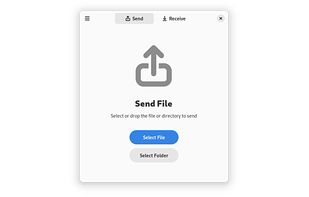
Fast and secure file transfer via Magic Wormhole protocol.

Cost / License
- Free
- Open Source (GPL-3.0)
Application type
Platforms
- Windows
- Linux
- Flathub
- Linux Mobile


Features
Highlights All activities
GNOME Warp News & Activities
Recent activities
- humble-advisor liked GNOME Warp
 TheEmperorArt added GNOME Warp as alternative to RelayPony
 Paul added GNOME Warp as alternative to FilePlease
 Paul added GNOME Warp as alternative to Sendaway
 Víctor Camacho added GNOME Warp as alternative to Clipcroft
 Anirban roy added GNOME Warp as alternative to ButterShare
 qingxin-hou added GNOME Warp as alternative to ShareCLIP
 TheEmperorArt added GNOME Warp as alternative to Flashbyte
 OwlTransfer added GNOME Warp as alternative to OWL Transfer
- 0807 added GNOME Warp as alternative to 0807


Developed by
Fina WilkeLicensing
Open Source (GPL-3.0) and Free product.Alternatives
133 alternatives listedBadge
Get an embeddable badge for GNOME WarpSupported Languages


Best Open Sourse Solution
A list with 39 apps by littlebighorse without a description.

Comments and Reviews
@Edit: Outdated: "There is no version for Windows"
Windows build version is available on the source code repository page.
@cel : like said on official README, but it's not...
"Download the latest Windows build from gitlab CI. Extract the archive to a directory of your choice and run warp.exe inside warp-windows-nightly. The releases page includes the latest Windows release."
You can find the windows version here: https://gitlab.gnome.org/World/warp/-/releases Do Ctrl+f and type "windows". Not every version is available for windows, but 0.6.2 is available, for instance.
Easy to use, looks pretty and works flawlessly.