Flashbyte icon
Flashbyte icon

Flashbyte

 1 like

Send and receive files directly between your devices, phone, laptop, or desktop, with no internet, no accounts, and no cloud uploads.
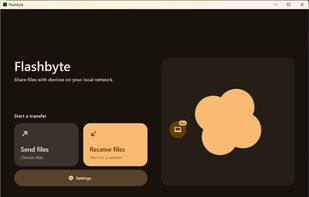
Flashbyte screenshot 1

Cost / License

  • Free
  • Open Source (MIT)

Since

  • New

Updated

  • Updated Oct 2026

Platforms

  • Mac
  • Windows
  • Linux
  • Android
  • iPhone
  • F-Droid
1like
0articles
Save

Features

Properties

Features

Highlights All activities

Flashbyte News & Activities

Recent activities

Flashbyte information

AlternativeTo Categories

File Sharing, Security & Privacy

GitHub repository

  •  55 Stars
  •  3 Forks
  •  3 Open Issues
  •   Updated  
View on GitHub
Flashbyte was added to AlternativeTo by TheEmperorArt on and this page was last updated .

No comments or reviews, maybe you want to be first?

What is Flashbyte?

Send and receive files directly between your devices, phone, laptop, or desktop, with no internet, no accounts, and no cloud uploads.

Features

  • TLS Encryption: You can send files over an encrypted connection.
  • Cross-platform support: Flashbyte is supported on all the major platforms!.
  • File sharing over local network: You can send files over local network, without wifi access.
  • Lossless file sharing: Send files in their original quality.
  • All file types supported: Send file of any type.
  • No file size limit: Send files no matter their size.
  • Doesn't use an external server: Flashbytes sends to devices using your local network.
  • Cross-platform: Transfer files to any device on your local network that has Flashbyte installed.
  • Open source & no data is collected: All of the code is readily available on github.

Flashbyte uses pure TCP sockets to establish a connection between two devices on a local network inside an isolate (isolated memory channel) which is then utilized to read and send over the file bytes whilst keeping the frontend (main UI isolate) smooth.