


Typora
A minimalist Markdown editor offering cross-platform synchronization, live preview, and seamless export/import in various formats like PDF, DOCX, and LaTeX. Features include distraction-free Focus and Typewriter modes, file management with tree and articles panels, and content organization through an outline panel.

Cost / License
- Pay once
- Proprietary
Application types
Platforms
- Mac
- Windows
- Linux
- Electron
- Visual Studio Code


Features
Properties
- Distraction-free
- Clean design
- Lightweight
- Support for Themes
- Minimalistic
- Customizable
Features
- Support for MarkDown
- Live Preview
- Write files in markdown
- WYSIWYG Support
- Save as Markdown
- Simple text editor
- Export to PDF
- Multiplatform
 Support for LaTeX
- Syntax Highlighting
- Spell Checking
- Built-in themes
- Distraction-free Writing
- Hyperlinks
- Works Offline
- Export to HTML
- Text editing
- Underline

- Nested Folders
- Full-Text Search
- Autocompletion
- Code Formatting
- Dark Mode
- No registration required
- Ad-free
- Flow diagram visualisation
- Multiple languages
- Real-time inline preview
- Electron based
- Outline mode
- Wiki

Typora News & Activities
Recent News
- POX published news article about Typora
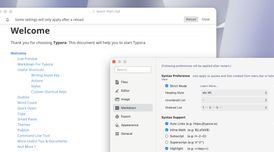 Typora 1.13 brings MathJax 4, Mermaid 11.12, improved search performance, and UI updates
Typora 1.13 has been released as the latest update to this cross-platform minimal Markdown editor. ...
- Fla published news article about Typora
 Typora for macOS adds Tahoe icon, restores share action, updates menus
Typora latest version, 1.12, for macOS introduces a Tahoe style icon with dark mode and custom colo...


Recent activities
- POX updated Typora
 POX added Typora as alternative to Prism Notes
- chriscthomas liked Typora
 4worlds added Typora as alternative to Inkwell Markdown Editor
 acewhitmore added Typora as alternative to Markdown Free


Featured in Lists
A vast compilation of great writing apps and word processors, for all your writing needs. From office suites to …

Master List of all Apps and Software I use for both work and personal life.

A list with 62 apps by xlin without a description.
What is Typora?
Typora is a software that simplifies reading and writing tasks by eliminating distractions like a preview window and markdown source code syntax symbols. It offers a live preview feature for focused content creation. Typora includes an efficient file organization system with a file tree panel and articles side panel, and syncs files with services like Dropbox or iCloud. It also features an Outline Panel for easy document navigation, and supports import and export functions in various formats including docx, OpenOffice, LaTeX, MediaWiki, Epub, and more. Other features include a word count display, Focus Mode and TypeWriter Mode for enhanced focus, and an Auto Pair feature for automatic completion of brackets, quotes, and markdown symbols.
Typora information
Developed by
 Qiyun (Shanghai) Technology Ltd.
 Licensing
Proprietary and Commercial product.Pricing
One time purchase (perpetual license) that costs $15.Rating
Average rating of 4.5Alternatives
182 alternatives listedNews
3 news article related to TyporaSupported Languages
- English


Comments and Reviews
For me as a typographer this app gets the gold star for distraction-free writing and at the same time presenting the content in the most beautiful way possible without any strange Markdown extensions or hacks.
I'm a bit concerned about their plans once they're out of beta and what the pricing model will be I really hope they don't go on a subscription model and keep the pricing sane. Here's my list of best Markdown writers so far:
Interface is beautiful but I can't see long term future as it is going to be a paid app after beta period. Zettlr is similar and it will be remain free forever. So I recommend Zettlr over Typora. No harm using it in beta period. As your notes are plain text, you are not tied to the editor.
I bought it because of its simplicity, elegance and Markdown features. And I really appreciate that it doesn't force you to use "vaults" - just open any file in any folder as needed. It is like a good text editor but with added Markdown capability. Definitely worth the $15 it costs.
But one very important feature is still missing, despite it having been requested for several years and repeatedly in the support forum:-
In Typora, it is not possible to move lines up or down - either through a keyboard shortcut, or the edit menu. The only way (at present) is to use the awkward old "highlight line, cut, and then paste again" method. For an app that is primarily designed for text editing, this is a serious ommission, especially as almost any other editor has this functionality. I would not complain if Typora were Open Source, because then it would be up to me or the community. But the developer has, afaik, for years ignored this feature request from various users. Bottom line, I have gone back to working Markdown files with VS Code and Obsidian.
Other than that, great little app.
I am usually a fan of FOSS products, but am willing to pay for an app (or donate) if I'm fully invested in it.
Typora is one of those apps because of it's minimalism and simplicity. Plus the app feels very lightweight on the resources.
The bits I really like:
So far, the pricing is perpetual and I hope they keep it that way. I feel that the investment is worth.
I have used a couple of other open source apps, like Beaver Notes and Zettlr. They are really worth looking at, but for me, Typora takes the crown.
Seemingly OK software. But going from free BETA to paid made everyone rethink their plans, and notice that other apps like Obsidian are free and offer way more
I must have tried 20 different markdown editors. Most of them have a clunky two-pane window with markdown on one side, and the rendered view on the other, which is just terrible.
Once I found Typora (in beta), I was hooked. It renders formatting as you type, and is a single-window with a super simple interface, exactly what I was looking for. Because I use it so much (to write stories), I ended up paying for a license, and I couldn't be happier.
You might enjoy Obsidian then
Love this editor, because of it's minimal design and feeling. Also, is highly customizable - I learned CSS while building my own theme. I prefer FOSS, but this one is really worth this one-time payment.