
Termilly icon
Termilly icon

Termilly

 Like

Every shell. One window. Termilly groups your terminals into workspaces, brings them back after a restart with their output, and shows you which coding agent is waiting on you.
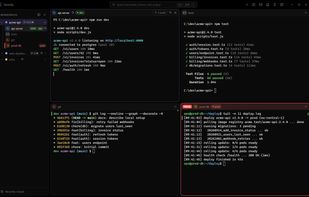
Termilly screenshot 1

Cost / License

Application type

Since

  • New

GitHub

  • GitHub stars: 44

Platforms

  • Windows
  • Mac
  • Linux
0likes
0articles
Save

Features

Properties

Features

Highlights All activities

Termilly News & Activities

Recent activities

Termilly information

AlternativeTo Category

AI Tools & Services

GitHub repository

  •  44 Stars
  •  1 Fork
  •  1 Open Issue
  •   Updated  
View on GitHub
Termilly was added to AlternativeTo by Paul on and this page was last updated .

No comments or reviews, maybe you want to be first?

Official Links

What is Termilly?

Every shell. One window. Termilly groups your terminals into workspaces, brings them back after a restart with their output, and shows you which coding agent is waiting on you.

What it does:

  • Workspaces. Terminals grouped by project, each with its own folder, shells and layout: tabs, splits and docked panes.
  • Comes back after a restart. Workspaces, terminals and their scrollback return as you left them, encrypted on disk. With "Keep shells running" on, closing or updating the window doesn't end the shells at all.
  • Coding agents in view. Claude Code's and Codex's state (working, waiting for you, done) shows in the sidebar and the title bar, with a notification when one needs you. A status bar under each terminal has the model, usage, cost and git branch.
  • Views for agents. Follow an agent one line per step, or see only your prompts and its answers. Set a terminal aside without closing it.
  • Change preview. Every file an agent edits, with its diff, while it works.
  • To do. Task lists for workspaces, terminals and SSH hosts. An agent implements a task, another reviews it, and it comes back to you for review.
  • Schedules. Commands, snippets and agent prompts on a schedule, with reports and notifications.
  • Remote. Your workspaces, terminals and agents from your phone or another computer.
  • The Git window. Changes, history and branches for the folder you're in, with one search across changed files, commits and the code they added.
  • One search for everything. Terminals, command history and output, from one box.
  • Every shell. PowerShell, cmd, Git Bash, WSL, SSH (with your ~/.ssh/config), serial ports and network consoles, side by side.
  • Snippets, tags and production guards. Saved commands with optional variables, and a red frame around terminals tagged prod.
  • Scriptable. A termilly command and an MCP server, so scripts and agents can use your terminals, To do, schedules and Notepad.