





HostAxe Terminal
Like
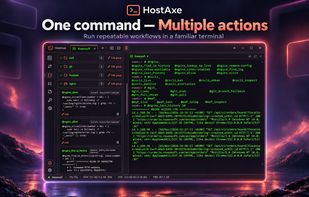
SSH terminal for local and remote sessions provides tabs, split panes, saved commands, aliases, notes, file transfers, and automation scenarios. Use one command to open workspaces, launch SSH connections, run diagnostics, and repeat recovery workflows.

Cost / License
- Pay once or Subscription
- Proprietary
Application typeApplication types
Since
- New
Platforms
- Windows
- Linux


Features
Highlights All activities
HostAxe Terminal News & Activities
Recent activities
- Yevhenii Pavlov thinks Ad-free is a important feature of HostAxe Terminal
- Yevhenii Pavlov thinks No Tracking is a important feature of HostAxe Terminal
- Yevhenii Pavlov thinks Command line interface is a important feature of HostAxe Terminal
- Danilo Venom added Macro Recording as a feature to HostAxe Terminal
 Danilo Venom added HostAxe Terminal as alternative to SSH Terminal Emulator, Web SSH, SSH Client Terminal, Submarine (SSH, SFTP, Terminal) and 1 more
- Danilo Venom updated HostAxe Terminal
- Danilo Venom updated HostAxe Terminal
- Yevhenii Pavlov added HostAxe Terminal
- Yevhenii Pavlov thinks Support for scripting is a important feature of HostAxe Terminal
- Yevhenii Pavlov thinks Privacy focused is a important feature of HostAxe Terminal


Developed by
 Roxensoft
Licensing
Proprietary and Commercial product.Pricing
One time purchase that costs $66, and / or subscription that costs $3 per month.Alternatives
23 alternatives listedBadge
Get an embeddable badge for HostAxe TerminalSupported Languages


No comments or reviews, maybe you want to be first?